Troubleshooting Guide for Hallolux 134A Toner Cartridges
Quick troubleshooting guide for Hallolux 134A toner cartridges. Learn how to handle printer warning lights and 'Used or Counterfeit' error messages when using compatible toner.
Table of contents
Manual images
Click an image to enlargeQuick Troubleshooting Guide
This guide provides solutions for common issues encountered when using Hallolux 134A toner cartridges in compatible printers. If you encounter warning lights or error messages, follow the steps below to continue your printing tasks.
Handling Printer Warning Lights
If a warning light appears on your printer while using the Hallolux 134A toner cartridge, please note the following:
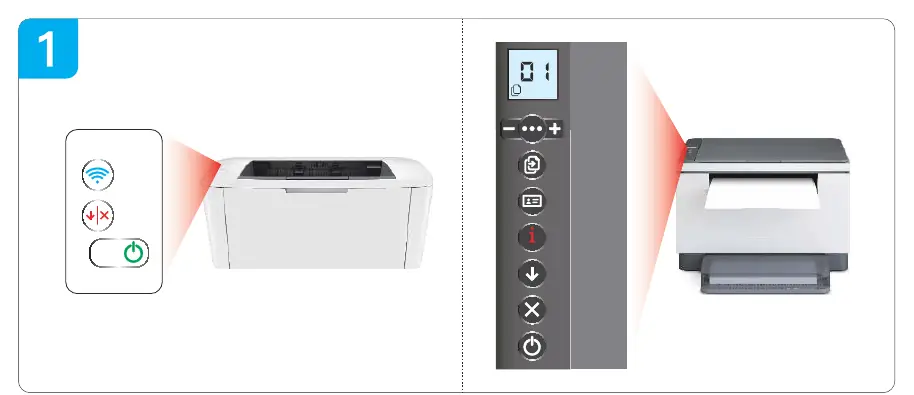
- Cause: The cartridge utilizes an OEM recycle chip.
- Action: This warning light is expected behavior and does not affect the print quality or the printer's functionality. You may safely ignore this light and continue with your daily work.
Managing Error Messages
When requesting a print job from your PC, you may see a pop-up message stating Used or Counterfeit Cartridge Installed. This is a common notification for third-party cartridges.
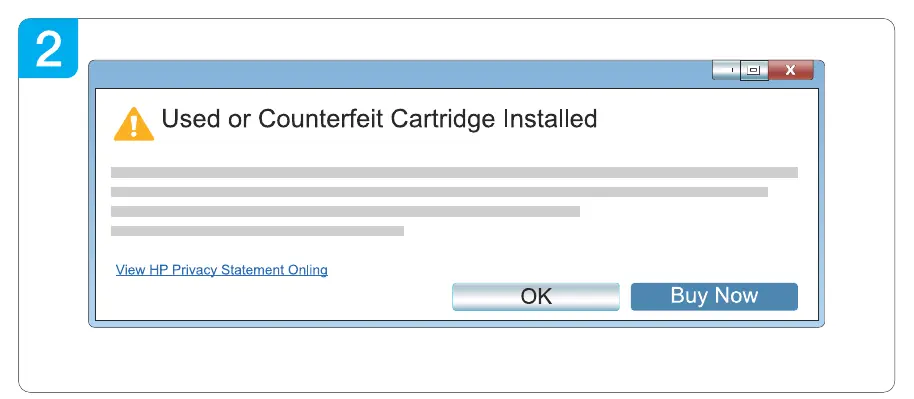
- Action: Simply click Confirm or the X button on the pop-up window to close the message and proceed with your print job.
Manufacturer information
HP Inc.
Practical help
Common problems
This is normal due to the OEM recycle chip. You can ignore the light as it does not affect daily work.
Click 'Confirm' or 'X' on the pop-up window to close it and continue printing.
Before use
- Ensure the toner cartridge is properly installed in the printer.
- Verify the printer is powered on and connected to the PC.

Manual page author
David Miller
Documentation analyst
Organizes user manual content into clear summaries, with attention to model details, product context, and everyday usability.