Home Appliances / Ovens
Icron USB 2.0 Ranger 2301 Extender System
Quick start guide for the Icron USB 2.0 Ranger 2301, a 1-port USB 100m CAT 5e/6/7 extender system featuring ExtremeUSB technology.
Table of contents
Product Overview
The Icron USB 2.0 Ranger 2301 is a high-performance 1-port USB extender system designed to extend USB 2.0 connections up to 100 meters over standard CAT 5e, CAT 6, or CAT 7 cabling. This system utilizes ExtremeUSB technology, providing transparent USB extension that is truly plug-and-play, requiring no additional software drivers for operation. It is compatible with all major operating systems, including Windows, macOS, Linux, and Chrome OS.
Installation and Setup
Setting up the Ranger 2301 is straightforward. Before beginning, ensure that all necessary drivers for your specific USB devices are already installed on your computer. The system consists of two main units: the Local Extender (LEX) and the Remote Extender (REX).
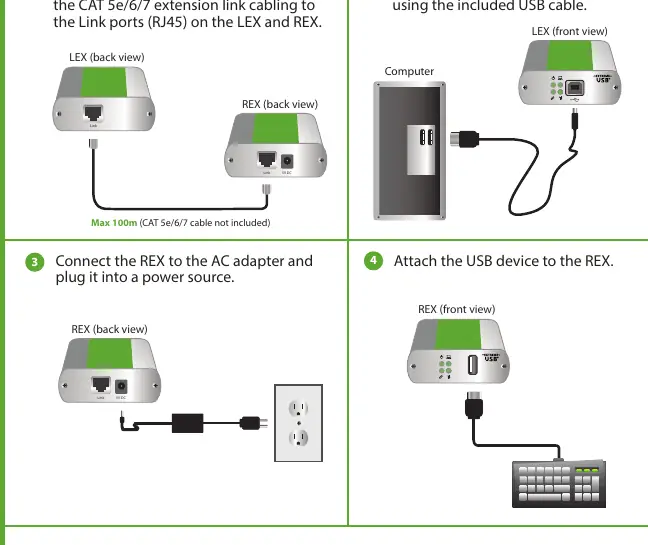
- Place the LEX and REX units in their desired locations.
- Connect the LEX and REX units using a CAT 5e/6/7 extension cable (not included) by plugging it into the Link ports on both devices.
- Connect the LEX unit to your computer using the provided USB cable.
- Connect the REX unit to the included AC power adapter and plug it into a power source.
- Finally, attach your USB device to the REX unit.
Safety and Maintenance
To ensure the longevity and safe operation of your device, please adhere to the following guidelines. Do not attempt to open the product casing, as this may cause damage and will void your warranty. Always use the specific power supply model provided with the product. When the device is not in use, it should be stored in a dry location with an ambient temperature between -20°C and 70°C. Failure to follow these instructions may result in improper operation or safety hazards.
Warranty and Support
Icron provides a two-year limited hardware warranty covering significant defects in material and workmanship. This warranty does not cover failures resulting from misuse, neglect, accidents, modifications, or unauthorized service. If you encounter issues, you must contact Icron to obtain a Return Material Authorization (RMA) number before returning any equipment. For further technical support, configuration details, or to access the complete online user guide, please visit the official Icron website.
Manufacturer information
Icron Technologies Corp
Practical help
Common problems
Device not recognized
Ensure all required drivers for the USB device are installed on the host computer and check all cable connections.
No power to REX unit
Verify that the AC power adapter is properly connected to the REX unit and plugged into a functional power outlet.
Before use
- Ensure all drivers for your USB device(s) are installed on the computer.
- Verify you have the LEX unit, REX unit, USB cable, and AC power adapter.
- Obtain a CAT 5e/6/7 cable of appropriate length (up to 100m).
- Ensure the installation environment is dry and within temperature limits.
Images and diagrams
- The LEX unit connects to the computer via USB and to the REX unit via CAT cable.
- The REX unit connects to the power adapter and provides the USB port for the peripheral device.
Model compatibility
- Compatible with Windows, macOS, Linux, and Chrome OS.
- Requires CAT 5e/6/7 cabling for the link connection.

Manual page author
Michael Turner
Technical manual editor
Reviews PDF manuals for structure, safety notes, and practical product details so readers can find the right information quickly.