Electronics / Speakers & Soundbars
iGear Galaxy 10W Bluetooth Speaker
A comprehensive user guide for the iGear Galaxy 10W Bluetooth Speaker. Learn how to operate your device, including Bluetooth pairing, TWS mode setup, FM radio tuning, TF card playback, and charging instructions.
Table of contents
Quick guide from the manual
The iGear Galaxy 10W Bluetooth Speaker is a portable wireless device featuring TWS (True Wireless Stereo) capability, FM radio, and TF card playback. For optimal performance, ensure the device is fully charged before first use. Note that for FM radio reception, the Type-C charging cable must be inserted into the charging slot to act as an antenna.
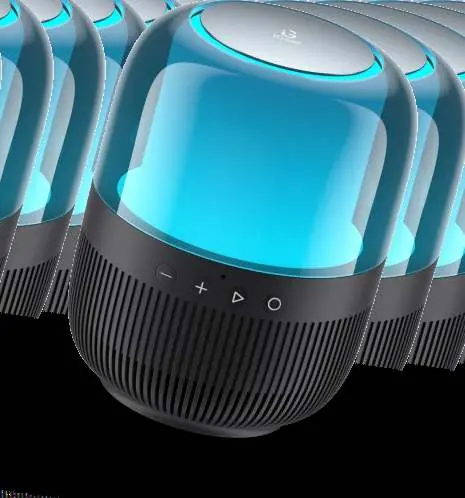
Device overview and controls
The speaker features a control panel with the following functions:
- Previous/Volume-: Short press to decrease volume, long press for previous song.
- Next/Volume+: Short press to increase volume, long press for next song.
- Play/Pause and Mode switching: Short press to play/pause, long press to switch between Bluetooth, TF card, and FM modes.
- Power button/Light mode switch: Long press to power on/off, short press to cycle through four lighting modes.
Bluetooth connection
- Long press the power button for three seconds to turn on the speaker. The breathing light will flash slowly.
- Enable Bluetooth on your smartphone or media player.
- Search for iGear GALAXY in your device's Bluetooth settings and select it to connect.
- The speaker will automatically reconnect to the last paired device when turned on.
True Wireless Stereo (TWS) mode
You can connect two iGear Galaxy speakers for a surround sound effect:
- Ensure Bluetooth is turned OFF on your smartphone or media player.
- Turn on both iGear Galaxy speakers.
- Press the play/pause button twice on one of the speakers. You will hear a "dong" sound.
- Wait for about one minute; a "TWS Pairing complete" prompt will indicate successful pairing.
- Turn on Bluetooth on your smartphone, search for "iGear Galaxy", and connect.
- To disconnect TWS, double-click the play/pause button.
FM mode and TF card
- FM Mode: Long press the play/pause button to switch to FM mode. Insert the Type-C cable into the charging slot to serve as an antenna. Press the play/pause button twice to start auto-channel search. Use the "+" and "-" buttons to select channels.
- TF Card Mode: Insert a TF card into the slot. The device will automatically recognize and play the music stored on the card.
Charging
The speaker has a built-in, non-removable rechargeable battery. Use the provided Type-C cable for charging. The power LED will light up red while charging and turn off once the battery is fully charged.
Safety precautions
- Charge the product using an input power of 5V/1A or below to protect the battery.
- Do not use the product near water; do not immerse or splash liquid on it.
- Keep the device away from heat sources like radiators or stoves.
- Do not obstruct the ports (charger port, LED port, microphone).
Manufacturer information
iGear
Practical help
Common problems
TWS pairing fails
Ensure Bluetooth is turned OFF on your smartphone before attempting to pair the two speakers together.
Poor FM radio reception
Ensure the Type-C charging cable is inserted into the charging slot, as it functions as the antenna.
Device not charging
Verify that the input power source is 5V/1A or lower. Using higher voltage may damage the battery.
Before use
- Charge the speaker fully using the provided Type-C cable.
- Ensure the charging port is clear of obstructions.
- If using TWS mode, disable Bluetooth on your phone first.
- Keep the device away from water and heat sources.
Specs in practice
- Rated power: 10W
- Indicates the audio output power of the speaker.
- Bluetooth V5.3
- The version of Bluetooth technology used for stable wireless connectivity.
- Battery: 3.7V/1500mAh
- The capacity of the internal rechargeable battery, providing up to 8 hours of play time at 50% volume.
Images and diagrams
- The control panel is located on the speaker body.
- Buttons 1 and 2 control volume and track navigation.
- Button 3 handles playback, mode switching, and TWS pairing.
- Button 4 controls power and lighting effects.
Model compatibility
- Supports Bluetooth, TWS, TF card, and FM radio.
- Requires 5V/1A input for safe charging.

Manual page author
David Miller
Documentation analyst
Organizes user manual content into clear summaries, with attention to model details, product context, and everyday usability.