User Manual for iJOY 1IJWC2103 Wireless Charger
Quick guide for the iJOY 1IJWC2103 Wireless Charger. Learn how to set up your charger, understand the LED indicator lights, and review technical specifications and safety warnings.
Quick answers from the manual
Quick answer
- The iJOY 1IJWC2103 is a wireless charger. Connect it to a power adapter using the provided USB cable. A blue light indicates charging, while a green light indicates standby or fully charged. p. 1
Key actions
- Connect the USB cable to the power adapter and the wireless charger. p. 1
First start
- Plug the power adapter into the socket and connect the USB cable to the charger. p. 1
Technical specifications
| Parameter | Value | Meaning | Pages |
|---|---|---|---|
| Input | 5V/1A | Power input requirement | p. 1 |
| Output | 5W | Charging power | p. 1 |
| Transmission Distance | 4mm | Maximum distance for charging | p. 1 |
Where to find it in the PDF
- User Manual p. 1
Table of contents
Quick guide from the manual
To begin using your iJOY 1IJWC2103 wireless charger, follow these steps:
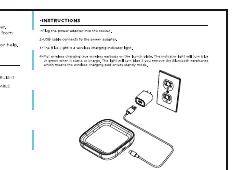
- Plug the power adapter into a wall socket.
- Connect the USB cable to the power adapter and the wireless charger.
- Place your device on the charger.
LED Indicators
The charger uses light indicators to show status:
- Blue Light: The device is currently charging.
- Green Light: The device is in standby mode or fully charged.
Technical Specifications
- Input: 5V/1A
- Output: 5W
- Transmission Distance: 4mm
- Efficiency: >75%
Safety and Maintenance
To avoid danger of suffocation, keep the plastic bag away from babies and children. Do not use this bag in cribs, beds, carriages, or playpens. This device is not a toy.
Practical help
Common problems
Ensure the USB cable is securely connected to both the power adapter and the charger. Verify the power adapter is plugged into a working wall socket.
Before use
- Ensure you have the provided Type-C charging cable.
- Check that your power adapter is compatible (5V/1A).
- Place the charger on a flat, stable surface.

Manual page author
Emily Carter
User documentation editor
Prepares concise manual descriptions and highlights the most useful setup, operation, and maintenance information for readers.