IKEA SPARLÅGA Alarm Clock User Manual
Quick guide for the IKEA SPARLÅGA alarm clock. Learn how to install batteries, set the time, and configure the alarm settings with this easy-to-follow manual.
Table of contents
Manual images
Click an image to enlargeQuick guide from the manual
This guide provides instructions for the IKEA SPARLÅGA alarm clock. The device is battery-operated and features manual controls for setting the time and alarm.
Battery installation
The clock requires 2x AA 1.5V batteries to operate. To install:
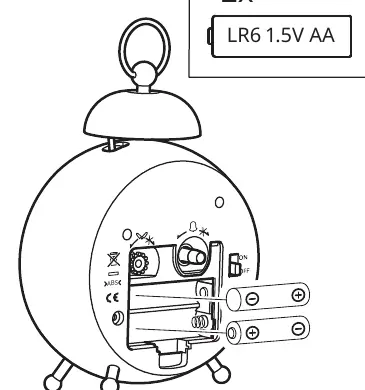
- Remove the battery compartment cover on the back of the clock.
- Insert two AA 1.5V batteries, ensuring the positive (+) and negative (-) terminals match the markings inside the compartment.
- Replace the battery cover securely.
Setting the time
To set the current time:
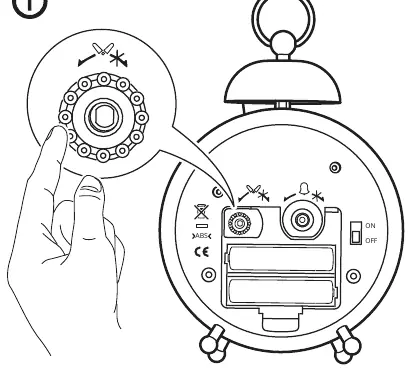
- Locate the knob on the back of the clock marked with a clock icon.
- Rotate the knob to adjust the hands to the correct time.
Setting the alarm
To set the alarm time:
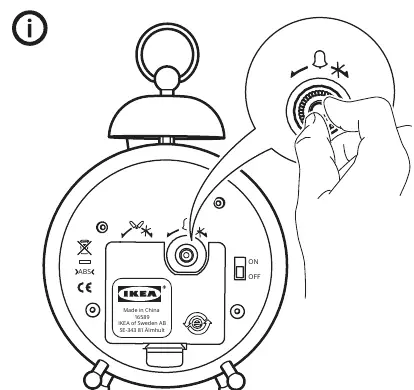
- Locate the knob on the back of the clock marked with a bell icon.
- Rotate the knob to set the desired alarm time.
Alarm operation
Use the switch on the back of the clock to control the alarm function:
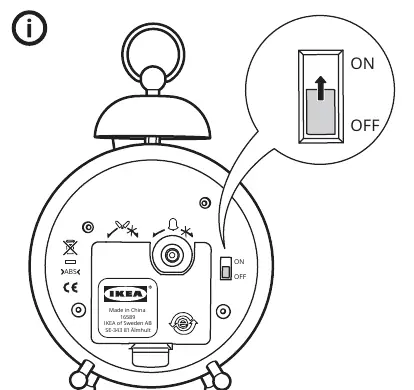
- ON: Slide the switch to the ON position to activate the alarm.
- OFF: Slide the switch to the OFF position to deactivate the alarm.
Manufacturer information
IKEA
Practical help
Common problems
Ensure the alarm switch on the back of the clock is set to the ON position.
Check that the batteries are inserted correctly according to the polarity markings and that they are not depleted.
Before use
- Purchase 2x AA 1.5V batteries (not included).
- Ensure the battery compartment is clean and free of debris.
- Verify the battery polarity (+/-) before insertion.

Manual page author
Michael Turner
Technical manual editor
Reviews PDF manuals for structure, safety notes, and practical product details so readers can find the right information quickly.