Electronics / FPGA IP Cores
User Guide for Low Latency 100G Ethernet Intel Stratix 10 FPGA IP Design Example
A comprehensive user guide for the Low Latency 100G Ethernet Intel Stratix 10 FPGA IP design example. This guide covers the generation, simulation, compilation, and hardware testing procedures using Intel Quartus Prime and the Ethernet...
Table of contents
Manual images
Click an image to enlargeQuick Guide from the Manual
The Low Latency 100G Ethernet Intel FPGA IP core provides a design example to help users compile, simulate, and test the IP core functionality. The design example is generated using the Intel Quartus Prime parameter editor and can be tested on the Intel Stratix 10 GX Transceiver Signal Integrity Development Kit.
Generating the Design
To generate the design example, follow these steps in the Intel Quartus Prime Pro Edition:
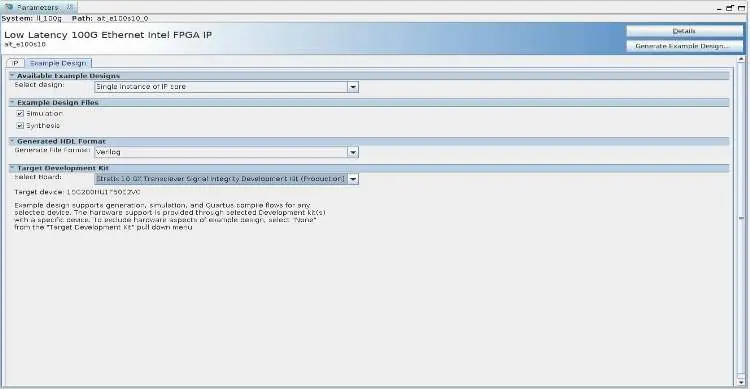
- Create or open a project with an Intel Stratix 10 device (L-tile or H-tile, speed grade -1 or -2).
- In the IP Catalog, select Low Latency 100G Ethernet.
- On the IP tab, configure your parameters.
- On the Example Design tab, select Simulation and/or Synthesis options.
- Select the Target Development Kit (or None).
- Click Generate Example Design.
Simulating the Design Example Testbench
The testbench verifies the IP core functionality through simulation. To simulate:
- Navigate to the <design_example_dir>/example_testbench directory.
- Run the simulation script for your chosen simulator (e.g., vsim -do run_vsim.do for ModelSim).
- Analyze the results; a successful testbench sends and receives ten packets and displays "Testbench complete."
Compiling and Configuring the Design Example in Hardware
To compile and configure the hardware design:
- Open the project alt_e100s10.qpf located in the hardware_test_design directory.
- On the Processing menu, click Start Compilation.
- After compilation, use the Programmer tool to program the .sof file onto the Intel Stratix 10 device via JTAG.
Testing the Hardware Design Example
Once configured, you can test the hardware using the System Console:
- Open System Console via the Tools menu.
- Change directory to hardware_test_design/hwtest.
- Source the main.tcl script to connect to the JTAG master.
- Use commands like loop_on to enable internal serial loopback, start_pkt_gen to begin packet transmission, and chkmac_stats to read MAC statistics.
Ethernet Toolkit Overview
The Ethernet Toolkit is a TCL-based debugging tool for real-time interaction with the Ethernet IP. It allows you to:
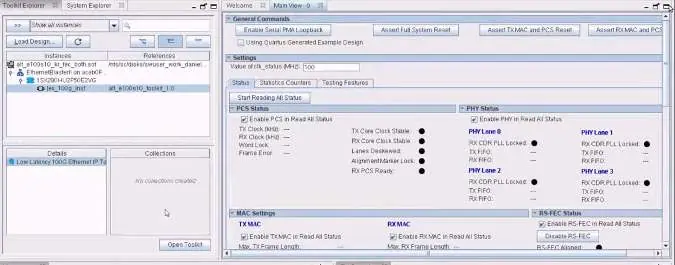
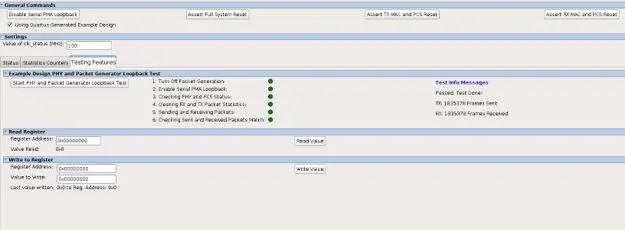
- Verify Ethernet link status.
- Read and write to status and configuration registers.
- Display TX/RX statistics.
- Execute testing procedures, including PHY and packet generator loopback tests.
Design Example Registers
The design example includes memory-mapped registers accessible via the System Console. Key register ranges include:
- 0x0300: PHY registers.
- 0x0400: TX MAC registers.
- 0x0500: RX MAC registers.
- 0x0800: TX Statistics Counter registers.
- 0x0900: RX Statistics Counter registers.
- 0x1000: Packet Client registers.
Official resources from the manual
Practical help
Common problems
Simulation fails with ModelSim - Intel FPGA Edition
This simulator does not have the capacity to simulate this IP core. Use a supported simulator such as ModelSim SE.
Design example files not generated
Ensure that at least one of the Simulation or Synthesis options is selected in the Example Design tab.
VHDL support
This IP core does not support VHDL; you must use Verilog HDL.
Before use
- Ensure Intel Quartus Prime Pro Edition is installed.
- Verify target device is Intel Stratix 10 (L-tile or H-tile).
- Check that transceiver and core speed grades are -1 or -2.
- Ensure production version devices are used.
- Select Simulation or Synthesis options in the parameter editor.
Images and diagrams
- Figure 1: Development steps flow from generation to testing.
- Figure 3: Simulation design example block diagram showing client logic and IP core.
- Figure 4: Hardware design example block diagram with JTAG and System Console.
Model compatibility
- Requires Intel Quartus Prime Pro Edition.
- Supports Intel Stratix 10 GX Transceiver Signal Integrity Development Kit.

Manual page author
David Miller
Documentation analyst
Organizes user manual content into clear summaries, with attention to model details, product context, and everyday usability.