Assembly instruction for Invicta Interior Console Panther 105cm
Quick assembly guide for the Invicta Interior Console Panther 105cm. Learn how to attach the panther legs to the marble top table correctly.
Table of contents
Manual images
Click an image to enlargeQuick assembly guide
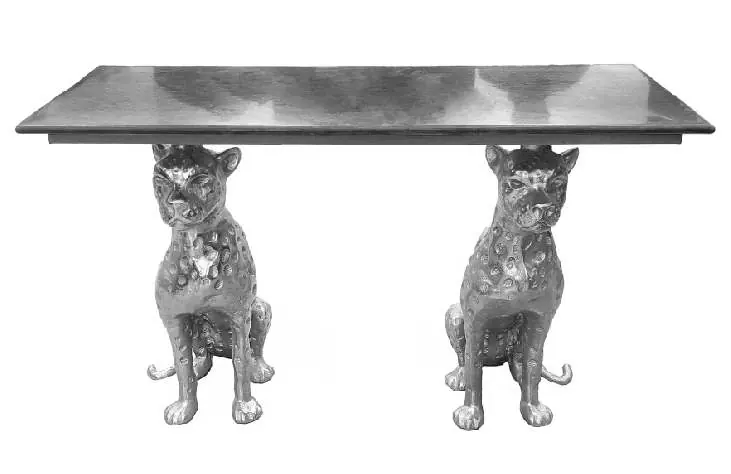
This document provides instructions for assembling the Invicta Interior Console Panther 105cm. The assembly process is straightforward and involves attaching the two decorative panther legs to the marble table top.
Parts list
The package contains the following components:
- 1x Marble table top
- 2x Panther-shaped legs
Assembly instructions
Follow these steps to assemble your console table:
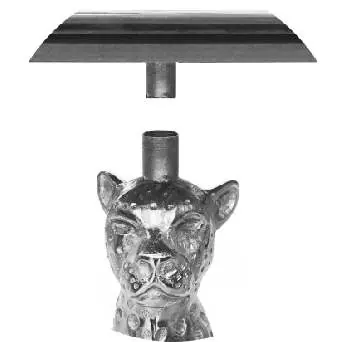
- Place the marble table top upside down on a soft, protective surface to prevent scratches.
- Identify the mounting points on the underside of the table top.
- Align the top of each panther leg with the corresponding mounting point on the table top.
- Insert the legs securely into the mounting points.
- Carefully turn the table over to its upright position.
Contact information
If you have any questions regarding this article, please contact your dealer or the manufacturer directly:
Invicta Interior GmbH & Co KGKirchenweg 8, 24568 NützenEmail: [email protected]: 04101 - 80 40 615
Manufacturer information
Invicta Interior GmbH & Co. KG
Practical help
Common problems
Ensure the mounting points on the table top are clean and free of debris. Verify that the legs are aligned vertically before insertion.
Before use
- Check all parts are present (1 table top, 2 panther legs)
- Ensure you have a soft surface to assemble the table on to avoid scratching the marble top
- Verify the assembly area is clear and stable

Manual page author
David Miller
Documentation analyst
Organizes user manual content into clear summaries, with attention to model details, product context, and everyday usability.