Kebidumei 10-in-1 USB-C Laptop Stand Docking Station
Comprehensive guide for the Kebidumei 10-in-1 USB-C Docking Station, featuring laptop stand functionality, 4K display support, and high-speed data transfer capabilities.
Table of contents
Introduction
The Kebidumei 10-in-1 USB-C Docking Station is a versatile all-in-one solution designed to enhance your laptop's connectivity while providing an ergonomic workspace. By combining a functional laptop stand with a comprehensive port hub, this device helps improve airflow and heat dissipation for your computer, ensuring stable performance during intensive tasks. It is an ideal accessory for professionals and students looking to expand their workstation capabilities with a single, efficient connection.
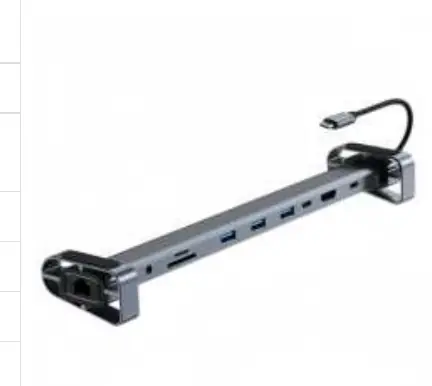
Key Features and Connectivity
This docking station is engineered for maximum utility, offering a wide array of ports to connect all your essential peripherals. The device features a 100W PD (Power Delivery) USB-C port, which supports pass-through charging, delivering up to 87W of power to your laptop. This ensures your device stays charged while you work. For visual output, the integrated HDMI port supports 4K resolution at 30Hz, allowing you to connect to external monitors, televisions, or projectors for high-definition video playback.
Data transfer is handled by three high-speed USB 3.0 ports, capable of speeds up to 5Gbps, making it easy to connect external drives, mice, keyboards, and other accessories. Additionally, the unit includes dual-card support for SD and TF cards, facilitating quick media transfers. For users requiring a stable internet connection, the built-in 100Mbps Ethernet port provides a reliable wired network link, which is often more consistent than wireless alternatives. A 3.5mm audio jack is also included, allowing for the direct connection of headphones or external speakers.
Setup and Usage
The Kebidumei docking station is designed for simplicity and ease of use. It utilizes a plug-and-play interface, meaning no additional drivers or software installations are required to get started. Simply connect the USB-C cable to your compatible laptop, and the system will automatically recognize the connected peripherals. The stand design is specifically crafted to elevate your laptop, which promotes better airflow underneath the chassis, effectively reducing heat buildup during prolonged use. This ergonomic elevation also helps in maintaining a more comfortable typing angle. The compact dimensions of 280 x 63 x 32mm make it a portable and space-saving addition to any desk setup, whether at home or in the office.
Practical help
Common problems
Ensure the USB-C power adapter is connected to the PD port and that the laptop supports USB-C Power Delivery.
Verify that the laptop's USB-C port supports DisplayPort Alt Mode and that the HDMI cable is securely connected.
Before use
- Ensure your laptop has a USB-C port that supports data and power delivery.
- Check that your monitor or TV supports 4K resolution for optimal display quality.
- Place the stand on a flat, stable surface to ensure proper airflow.
- Connect the docking station directly to the laptop's USB-C port.
Specs in practice
- 100Mbps Ethernet
- Provides a wired network connection speed of up to 100 Megabits per second.
Images and diagrams
- The device features a long, slim profile designed to act as a riser for the laptop.
- Ports are located along the side/rear for easy cable management.
- The integrated USB-C cable connects the dock to the host computer.
Model compatibility
- Compatible with most modern laptops equipped with a USB-C port.
- Plug-and-play functionality requires no driver installation.

Manual page author
Emily Carter
User documentation editor
Prepares concise manual descriptions and highlights the most useful setup, operation, and maintenance information for readers.