User Manual for Knog PWR 10W Solar Panel
Quick start guide for the Knog PWR 10W Solar Panel. Learn how to unfold, position for optimal charging, and interpret LED indicators for irradiation and charging rates.
Table of contents
Quick Start Guide
The Knog PWR 10W Solar Panel is a compact, foldable charger designed to harness solar energy. Follow these steps to set up and use your device effectively.
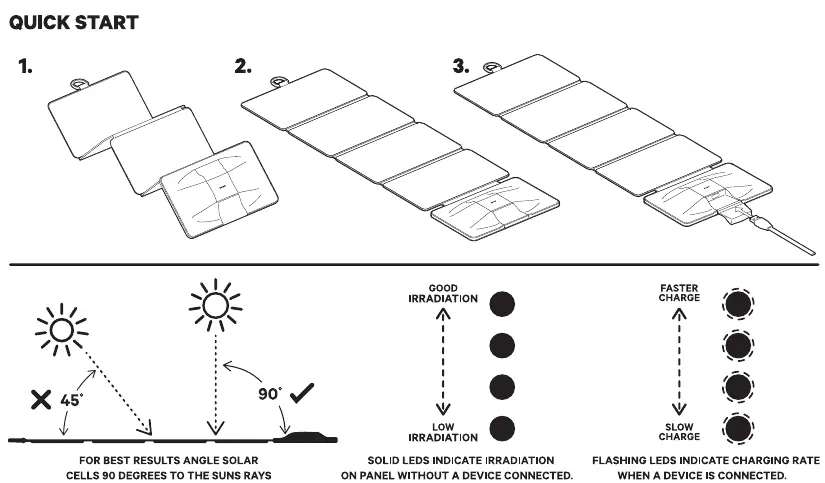
Unfolding the Panel
- Remove the solar panel from its packaging.
- Unfold the panels completely to expose the maximum surface area to sunlight.
- Ensure the device is laid flat on a stable surface before connecting your equipment.
Optimal Positioning
To achieve the best charging results, the solar cells must be angled 90 degrees directly towards the sun's rays. Avoid placing the panel at shallow angles (such as 45 degrees), as this significantly reduces efficiency.
Understanding LED Indicators
The LED indicators on the panel provide real-time feedback on performance:
- Solid LEDs: Indicate the level of irradiation on the panel when no device is connected.
- Flashing LEDs: Indicate the charging rate when a device is connected to the panel.
Manufacturer information
Knog
Practical help
Common problems
Ensure the solar panel is angled 90 degrees directly towards the sun's rays. Avoid shallow angles.
Before use
- Unfold the solar panel completely.
- Place the panel on a stable, flat surface.
- Ensure the panel is positioned in direct sunlight.
- Check the LED indicators to verify irradiation levels before connecting a device.

Manual page author
David Miller
Documentation analyst
Organizes user manual content into clear summaries, with attention to model details, product context, and everyday usability.