Quick Start Guide for Knog PWR Solar 10W Solar Charger
Learn how to use your Knog PWR Solar 10W charger. This guide covers setup, optimal solar positioning, and understanding LED charging indicators for efficient operation.
Table of contents
Manual images
Click an image to enlargeQuick Start Guide
The Knog PWR Solar 10W is a compact, folding solar charger designed for portable power. Follow these steps to begin using the device:
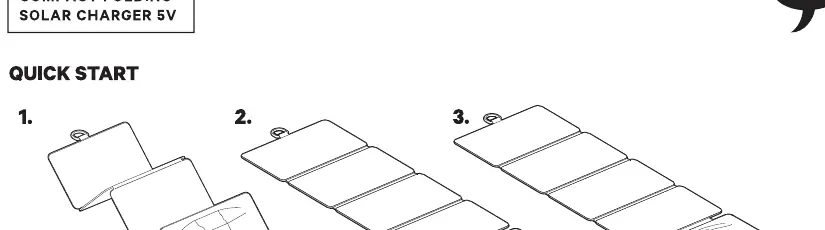
- Unfold: Fully unfold the solar panels to expose the maximum surface area to sunlight.
- Position: Place the panels in direct sunlight.
- Connect: Connect your device to the charger using a compatible USB cable.
Optimal Solar Positioning
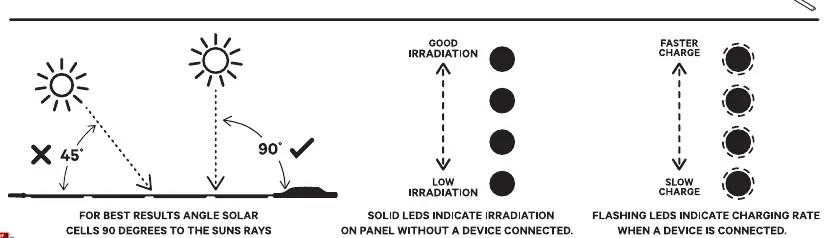
To achieve the best charging results, the solar cells must be angled correctly relative to the sun. The optimal position is 90 degrees to the sun's rays. Avoid placing the panels at shallow angles (e.g., 45 degrees), as this significantly reduces efficiency.
Understanding LED Indicators
The LED indicators on the charger provide real-time feedback on the solar irradiation and charging status:
- Solid LEDs (No device connected): Indicates the current level of solar irradiation being received by the panel. More solid lights mean higher irradiation.
- Flashing LEDs (Device connected): Indicates the charging rate. Faster flashing indicates a faster charge, while slower flashing indicates a slower charge.
Manufacturer information
Knog
Practical help
Common problems
Ensure the solar panels are angled at 90 degrees directly towards the sun. Adjust the panel position to maximize irradiation.
Check that the USB cable is securely connected to both the charger and your device. Ensure the panels are receiving sufficient direct sunlight.
Before use
- Ensure the solar panels are fully unfolded.
- Verify the panels are placed in direct, unobstructed sunlight.
- Check that the USB cable is compatible with your device.
- Observe LED indicators to confirm the panel is receiving irradiation.

Manual page author
Michael Turner
Technical manual editor
Reviews PDF manuals for structure, safety notes, and practical product details so readers can find the right information quickly.