LaView B9 Outdoor 1080P Security Camera User Guide
Comprehensive setup and operation guide for the LaView B9 Outdoor 1080P Security Camera, including app configuration, Wi-Fi pairing, and Alexa integration.
Table of contents
Product Overview
The LaView B9 Outdoor 1080P Security Camera is designed to provide reliable surveillance for your home. This camera features high-definition video recording, two-way audio communication, and seamless integration with mobile devices and smart home ecosystems like Amazon Alexa. The device is equipped with a built-in microphone, speaker, and a microSD card slot for local storage, ensuring you can monitor your property effectively.
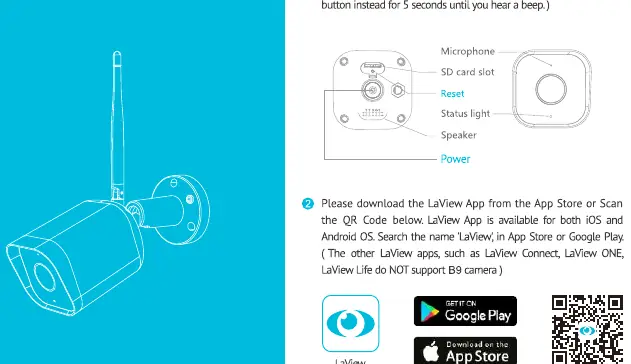
Initial Setup and App Configuration
To begin using your camera, first connect it to a power source using the included adapter. Ensure your smartphone is connected to a 2.4GHz Wi-Fi network, as the camera does not support 5GHz networks. Download the LaView app from the Apple App Store or Google Play Store. Create an account and follow the in-app registration process. Once registered, select the option to add a new device and choose the Video Surveillance category.
Wi-Fi Pairing Process
During the pairing process, the app will prompt you to enter your Wi-Fi credentials. The camera will generate a QR code on your phone screen. Hold your phone approximately 6 to 8 inches away from the camera lens so it can scan the code. You will hear a prompt from the camera once the scan is successful. Wait for the connection process to complete. If the camera fails to connect, press and hold the reset button for 5 seconds until you hear a beep, then restart the setup process.
Live View and Playback
Once connected, you can access the live feed through the LaView app. The interface allows you to toggle between high-definition and standard-definition video, mute or unmute audio, and use the two-way talk feature by pressing and holding the microphone icon. You can also take screenshots, record video clips directly to your phone, and view recordings stored on the microSD card or cloud storage if subscribed.
Amazon Alexa Integration
The LaView B9 camera supports voice control via Amazon Alexa. To set this up, ensure your camera is online in the LaView app. Open the Alexa app, navigate to Skills & Games, and search for the LaView skill. Enable the skill and link your LaView account. Once linked, Alexa will discover your camera, allowing you to view the live feed on compatible Echo devices by using voice commands.
Manufacturer information
LaView
Practical help
Common problems
Ensure your phone is on a 2.4GHz network, reset the camera by holding the button for 5 seconds, and try the QR code scan again.
Verify the camera is online in the LaView app, then re-run the 'Discover Devices' command in the Alexa app.
Before use
- Connect the camera to power using the provided adapter
- Ensure your smartphone is connected to a 2.4GHz Wi-Fi network
- Download the LaView app from the App Store or Google Play
- Have your Wi-Fi password ready
- Ensure the camera is within 6-8 inches of the phone during QR code scanning
Specs in practice
- 2.4GHz Wi-Fi
- The required frequency band for the camera to connect to your home network.
- Two-Way Audio
- Allows you to listen through the camera and speak back through the app.
- MicroSD Slot
- Physical port for inserting a memory card to store recorded video locally.
Images and diagrams
- The app setup sequence involves registering an account, selecting the device, and scanning a QR code.
- The live view interface includes buttons for snapshots, recording, and two-way audio.
- Alexa integration requires linking the LaView skill within the Alexa app.
Model compatibility
- Supports 2.4GHz Wi-Fi networks only; 5GHz is not supported.
- Compatible with Amazon Alexa for voice-controlled live streaming.

Manual page author
Emily Carter
User documentation editor
Prepares concise manual descriptions and highlights the most useful setup, operation, and maintenance information for readers.