User Manual for Leuchten Direkt 993852 LED Panel
Quick guide for the Leuchten Direkt 993852 LED panel. Includes installation steps, wiring instructions, remote control setup, and technical specifications.
Table of contents
Quick Guide for Leuchten Direkt 993852
This document provides the necessary installation and operation instructions for the Leuchten Direkt 993852 LED panel. Ensure the power is disconnected before starting any installation work.
Installation Steps
- Power Off: Ensure the main power supply is switched off before beginning installation.
- Drilling: Drill holes in the ceiling using a 6mm drill bit.
- Mounting: Secure the mounting bracket to the ceiling.
- Wiring: Connect the power wires to the terminal block (L and N).
- Attachment: Attach the LED panel to the mounted bracket.
- Securing: Ensure the panel is securely fastened.
- Power On: Restore the power supply.
Remote Control Setup
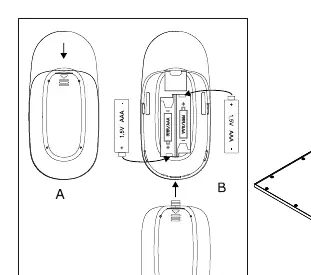
The remote control requires 2x 1.5V AAA batteries. Open the battery compartment on the back of the remote and insert the batteries, ensuring correct polarity as indicated in the diagram.
Technical Specifications
- Power: 35 W
- Brightness: 4000 lm
- Color Temperature: 2700 - 5000 K (CCT)
- Frequency: 2.4 GHz
- Voltage: 230 V / 50 Hz
Manufacturer information
LeuchtenDirekt GmbH
Practical help
Common problems
Verify that the main power supply is switched on and that the wiring (L and N) is correctly connected to the terminal block.
Check that the 2x 1.5V AAA batteries are inserted correctly with the proper polarity.
Before use
- Ensure the power supply is switched off
- Prepare a 6mm drill bit for ceiling mounting
- Verify the power supply is 230V/50Hz
- Have 2x 1.5V AAA batteries ready for the remote control

Manual page author
Emily Carter
User documentation editor
Prepares concise manual descriptions and highlights the most useful setup, operation, and maintenance information for readers.