LEVOLOR 15-Channel InMotion Remote User Guide
Quick start guide for the LEVOLOR InMotion 15-Channel remote, covering pairing, operation, and regulatory compliance.
Table of contents
Product Overview
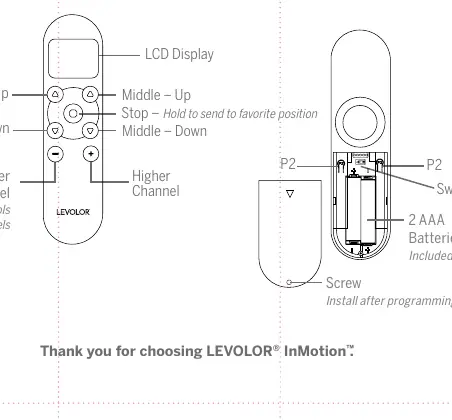
The LEVOLOR InMotion 15-Channel Remote provides effortless light control for window coverings. It features an LCD display, channel selection buttons, and dedicated controls for top-down/bottom-up and day/night shade configurations.
Pairing the Remote
Pair your remote before installing the window coverings:
- Use the - and + buttons to select the desired channel.
- Press and hold the programming button on the window covering for approximately 2 seconds until the shade jogs or beeps once.
- Within 10 seconds, press and hold the stop button on the remote until the shade jogs twice or beeps three times.
Operation
The remote allows for precise control of your shades. Use the channel buttons to switch between channels, where channel 0 controls all channels simultaneously. The stop button can be held to send the shade to a pre-set favorite position. The remote is powered by 2 AAA batteries.
Safety and Compliance
This device complies with Part 15 of the FCC Rules and Industry Canada license-exempt RSS standards. Operation is subject to the conditions that the device must not cause harmful interference and must accept any interference received. Any unauthorized modifications to the unit may void the user's authority to operate the equipment. If interference occurs, try reorienting the receiving antenna, increasing separation between equipment and receiver, or connecting to a different circuit.
Maintenance and Disposal
The remote includes a screw for the battery compartment, which should be installed after programming. Ensure batteries are replaced with 2 AAA batteries when necessary. Follow local regulations for the proper disposal of electronic devices and batteries.