LG 17BR30T LED LCD Monitor Quick Setup Guide
Quick setup guide for the LG 17BR30T LED LCD monitor. Includes connection instructions, technical specifications, and compatibility warnings.
Table of contents
Manual images
Click an image to enlargeQuick guide from the manual
This document provides essential setup instructions for the LG 17BR30T LED LCD monitor. It covers the connection of cables, power setup, and technical specifications to ensure proper operation.

Connections
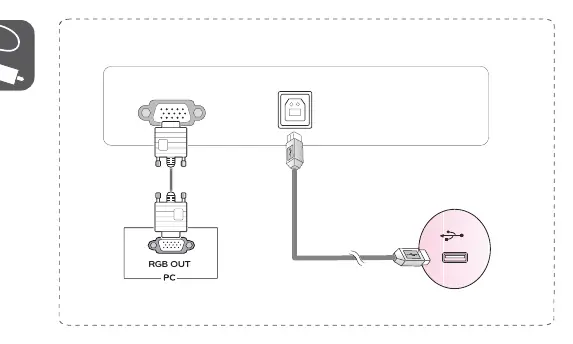
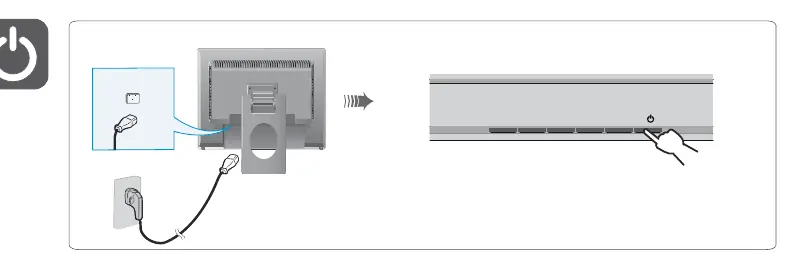
Connect the monitor to your PC using the provided RGB cable. Ensure the power cable is securely connected to the monitor and a power outlet. It is recommended to use the supplied components to ensure optimal performance.
Important Usage Notes
To avoid device malfunction, ensure you use the supplied cables. Specifically, using DVI to HDMI or DisplayPort to HDMI cables may cause compatibility issues.
Technical Specifications
The monitor operates at a recommended resolution of 1280 x 1024 at 60 Hz. Power requirements are 100-240 V~ 50/60 Hz.
Manufacturer information
LG Electronics
Practical help
Common problems
Ensure you use the supplied cables. Using DVI to HDMI or DisplayPort to HDMI cables may cause compatibility issues.
Before use
- Check that all supplied components are present.
- Ensure you have the correct cables for your PC connection.
- Verify power source (100-240 V~ 50/60 Hz).

Manual page author
Emily Carter
User documentation editor
Prepares concise manual descriptions and highlights the most useful setup, operation, and maintenance information for readers.