User Manual for LG 24BA560, 27BA560, 24BA550, 27BA550 Monitor
Quick guide for LG 24BA560, 27BA560, 24BA550, and 27BA550 monitors. Includes assembly instructions, cable connection diagrams, and technical specifications.
Quick answers from the manual
Quick answer
- This manual provides assembly, connectivity, and technical specifications for LG 24BA560, 27BA560, 24BA550, and 27BA550 monitors. p. 1
Key actions
- Assemble the stand p. 2
- Connect cables p. 3
First start
- Connect the power cable to the AC-IN port and plug into a power outlet. p. 4
Show 2 more answers Show less
Technical specifications
| Parameter | Value | Meaning | Pages |
|---|---|---|---|
| Resolution | 1920 x 1080 | Recommended resolution | p. 5, 6 |
| Vertical Frequency | 60 Hz | Refresh rate | p. 5, 6 |
| Power | 100-240 V~ 50/60 Hz 0.69 A | Power input rating | p. 5, 6 |
Where to find it in the PDF
- Assembly p. 2
- Connectivity p. 3
- Specifications p. 5, 6
Table of contents
Manual images
Click an image to enlargeQuick guide from the manual
This manual provides setup and configuration instructions for the LG 24BA560, 27BA560, 24BA550, and 27BA550 monitor series. It covers physical assembly, cable connectivity, power connection, and technical specifications.
Assembly and Setup
Follow these steps to assemble the monitor stand:
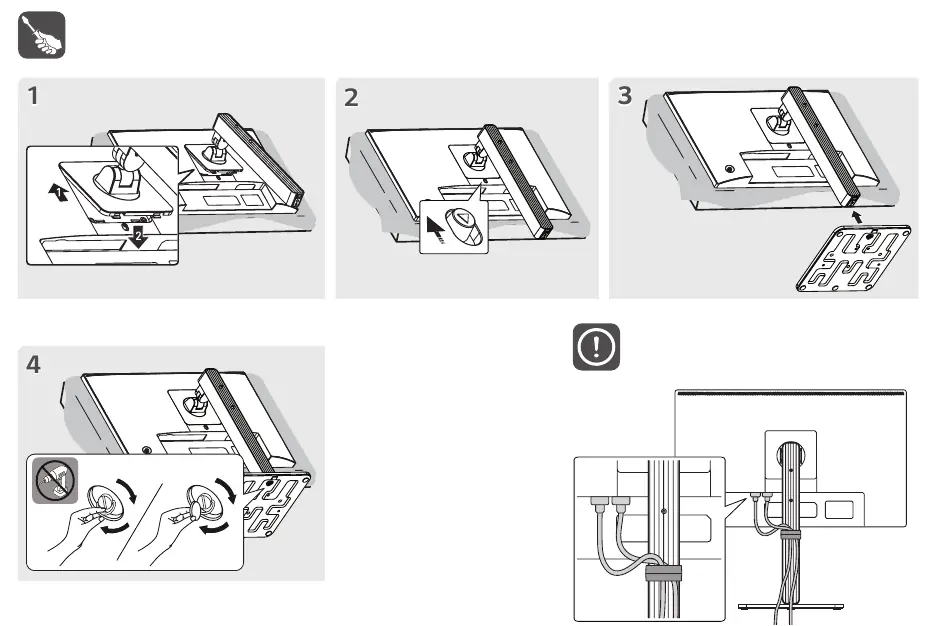
- Place the monitor face down on a flat surface.
- Attach the stand base to the monitor arm.
- Secure the stand using the provided screws.
- Ensure the stand is firmly attached before standing the monitor upright.
Connectivity
The monitor supports various input types. Refer to the connectivity diagram to identify the correct ports:
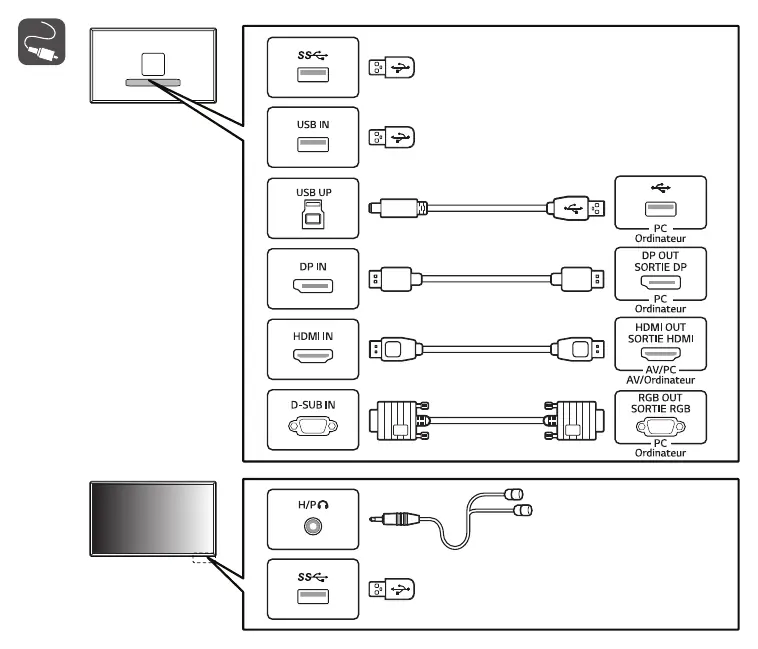
- USB: USB IN and SS (SuperSpeed) ports.
- Video Inputs: DisplayPort (DP IN), HDMI (HDMI IN), and D-SUB (VGA).
- Audio: Headphone/Audio output port.
Power Connection
To power on the monitor:
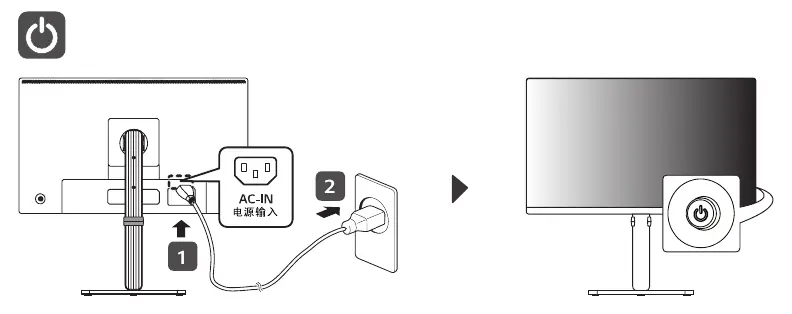
- Connect the power cable to the AC-IN port on the back of the monitor.
- Plug the other end into a standard power outlet (100-240 V~ 50/60 Hz).
- Press the power button to turn the unit on.
Technical Specifications
The monitor supports a recommended resolution of 1920 x 1080 at 60 Hz. Power consumption is rated at 0.69 A.
Manufacturer information
LG Electronics
Practical help
Before use
- Ensure all cables are included in the package
- Place monitor on a flat, stable surface
- Attach stand securely using provided screws
- Connect power cable to AC-IN port
Specs in practice
- Vertical Frequency
- 60 Hz
- Power Rating
- 100-240 V~ 50/60 Hz 0.69 A

Manual page author
Michael Turner
Technical manual editor