User Manual for LG 24BQ55WY LED LCD Monitor
Quick guide for the LG 24BQ55WY LED LCD Monitor. Includes assembly instructions, port layout, compatibility warnings, and setup recommendations.
PDF source: polski · summary: English
Quick answers from the manual
Quick answer
- The LG 24BQ55WY is an LED LCD monitor. This manual covers assembly, port connections, and important compatibility warnings regarding video cables and the USB hub. p. 2, 5, 6
Key actions
- Assemble the monitor stand p. 5
Problems and fixes
Avoid DVI/DP to HDMI adapters
p. 7, 8, 9Show 1 more answers Show less
Where to find it in the PDF
- Assembly p. 5
Table of contents
Manual images
Click an image to enlargeQuick guide from the manual
This manual provides essential setup and usage information for the LG 24BQ55WY LED LCD Monitor. It is recommended to use the components supplied with the product to ensure proper functionality and avoid device malfunction.
Assembly and Installation
Follow these steps to assemble the monitor stand:
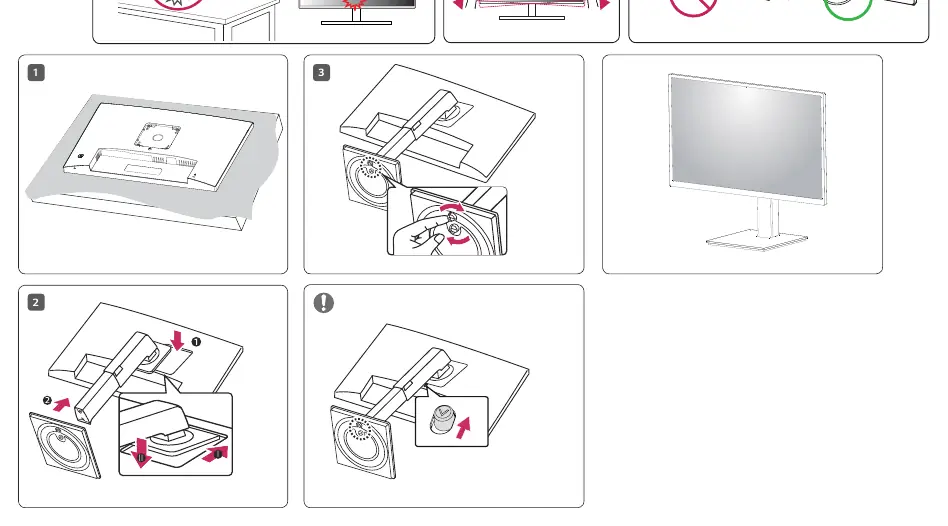
- Place the monitor face down on a flat surface.
- Attach the stand base to the monitor body.
- Secure the stand using the provided locking mechanism.
Port Layout
The monitor features several connectivity options:
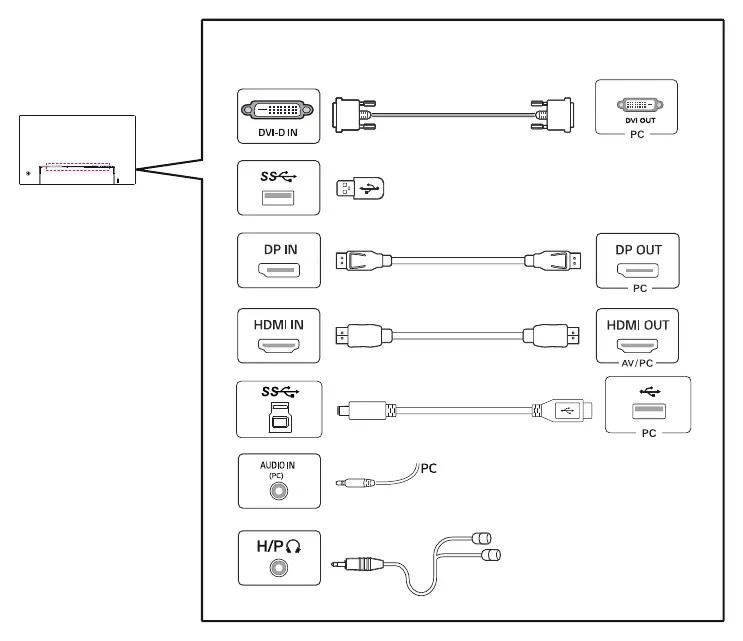
- DVI-D IN
- USB (SS)
- DP IN (DisplayPort)
- HDMI IN
- AUDIO IN (PC)
- H/P (Headphone output)
Important Usage Warnings
Please observe the following to ensure optimal performance:
- Compatibility: Using DVI to HDMI or DisplayPort to HDMI cables may cause compatibility issues. It is recommended to use native cables.
- USB Hub: The USB port on the product functions as a USB hub.
- Cables: Always use the cables supplied with the product to prevent malfunctions.
Manufacturer information
LG Electronics
Practical help
Common problems
Avoid using DVI to HDMI or DP to HDMI cables if possible; use native cables.
Ensure the USB cable is connected to the PC.
Before use
- Check all supplied components
- Use only the provided cables
- Ensure proper assembly of the stand

Manual page author
Emily Carter
User documentation editor