Assembly Instructions for Living Spaces 2230S Dining Chair
Step-by-step assembly guide for the Living Spaces 2230S dining chair. Includes parts list, hardware identification, and assembly instructions to ensure proper setup.
Quick answers from the manual
Quick answer
- This document provides assembly instructions for the Living Spaces 2230S dining chair, including a parts list and step-by-step assembly guide. p. 1
Key actions
- Do not tighten all bolts until the chair is completely assembled. p. 1
First start
- Assemble the chair by attaching the backrest to the seat, then attaching the back and front legs using the provided hardware. p. 1
Where to find it in the PDF
- Assembly Instructions p. 1
Table of contents
Quick Guide
Important: Do not tighten all bolts until the chair is completely assembled. This ensures proper alignment of all parts.
Parts List
- 1: Seat assembly (1 pc)
- 2: Backrest (1 pc)
- 3: Front legs (2 pcs)
Hardware List
- A: Ø1/4" x 20 x 3-1/8" bolts (4 pcs) - For chair back leg corner
- B: Ø1/4" x 20 x 2-3/8" bolts (4 pcs) - For chair front legs
- C: Ø1/4" x 20 x 1-1/2" bolts (2 pcs) - For chair back center
- D: M4 x 58mm Allen key (1 pc)
Assembly Instructions
Follow these steps to assemble your chair:
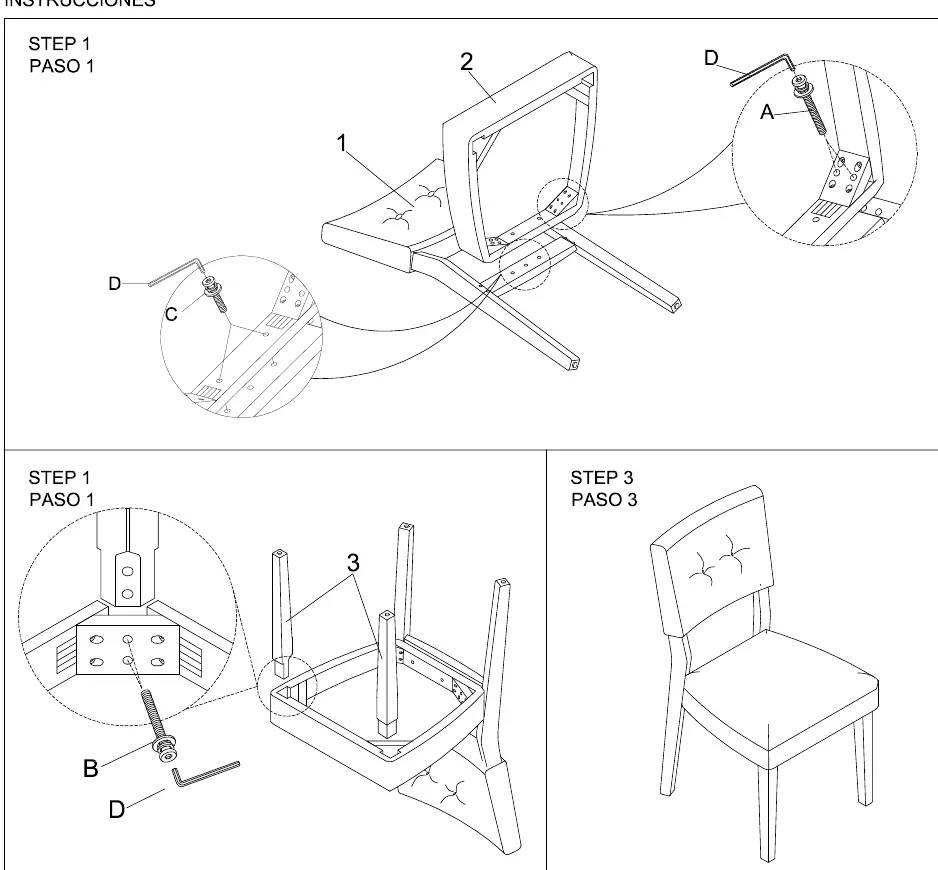
- Attach Backrest: Connect the backrest (2) to the seat assembly (1) using hardware C and the Allen key (D).
- Attach Back Legs: Secure the back legs to the seat assembly using hardware A.
- Attach Front Legs: Attach the front legs (3) to the seat assembly using hardware B.
- Final Tightening: Once all parts are in place, go back and fully tighten all bolts.
Practical help
Common problems
Ensure all bolts are tightened evenly only after the chair is fully assembled. If it remains wobbly, loosen bolts slightly, level the chair on a flat surface, and re-tighten.
Check all packaging materials thoroughly. If hardware is missing, contact Living Spaces customer support.
Before use
- Verify all parts (1, 2, 3) are present.
- Identify all hardware (A, B, C, D).
- Clear a soft, clean area for assembly to prevent scratching the upholstery.
- Ensure you have the provided Allen key (D).

Manual page author
David Miller
Documentation analyst
Organizes user manual content into clear summaries, with attention to model details, product context, and everyday usability.