Logitech Combo Touch Setup Guide
A quick setup guide for the Logitech Combo Touch keyboard case. Learn how to install your iPad, connect the keyboard, and access additional features via the companion app.
Table of contents
Manual images
Click an image to enlargeQuick guide from the manual
This guide provides the essential steps to install your iPad into the Logitech Combo Touch keyboard case and connect it for use. It also directs you to the companion app for enhanced functionality.

Setup
Follow these steps to install your device:
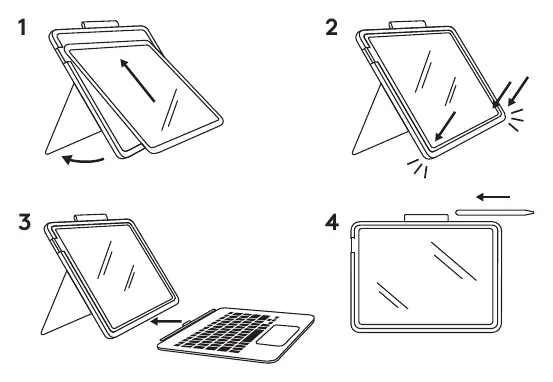
- Insert iPad: Align your iPad with the case and slide it in.
- Secure: Press the iPad firmly into the case to ensure it is seated correctly and all edges are secure.
- Connect: Attach the keyboard connector to the Smart Connector on the side of the iPad.
- Stylus: Place your stylus or Apple Pencil in the designated holder on the top of the case.
Software
To access more features, firmware updates, and customization options, download the companion app. You can find the app by visiting www.logitech.com/combo-touch-app or by scanning the QR code provided in the manual.
Official resources from the manual
Manufacturer information
Logitech
Practical help
Common problems
Ensure the Smart Connector pins on both the iPad and the keyboard are clean and free of debris. Disconnect and reconnect the keyboard.
Ensure you are using the correct model of the Combo Touch case for your specific iPad generation. Press firmly along the edges to snap the iPad into place.
Before use
- Verify your iPad model is compatible with this specific Combo Touch case.
- Ensure the iPad is clean and free of debris before insertion.
- Check that the Smart Connector pins are clean.
- Download the companion app for full feature access.

Manual page author
Michael Turner
Technical manual editor
Reviews PDF manuals for structure, safety notes, and practical product details so readers can find the right information quickly.