User Manual for Logitech G923 Racing Wheel and Pedals
Quick setup guide for the Logitech G923 Racing Wheel and Pedals. Learn how to connect your pedals, power supply, and configure the mode switch for PC, PS4, or PS5.
Table of contents
Manual images
Click an image to enlargeQuick Start Guide
This guide provides instructions for setting up the Logitech G923 Racing Wheel and Pedals. Ensure all components are present before beginning the installation.
Box Contents
- Racing Wheel
- Pedal Unit
- Power Adapter and Cable
Setup and Connection
Follow these steps to connect your equipment:
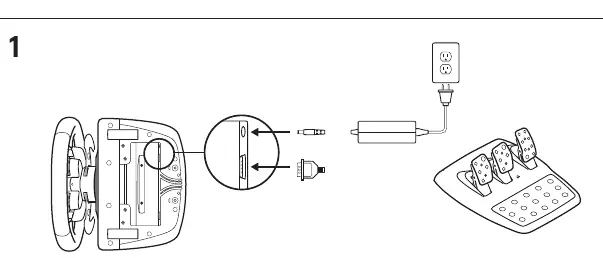
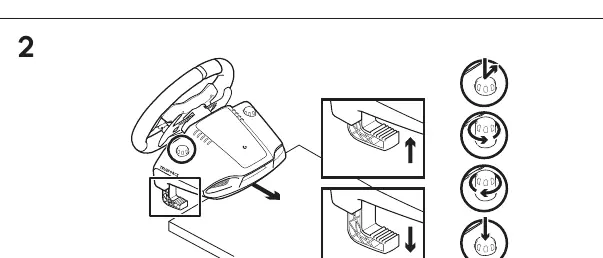
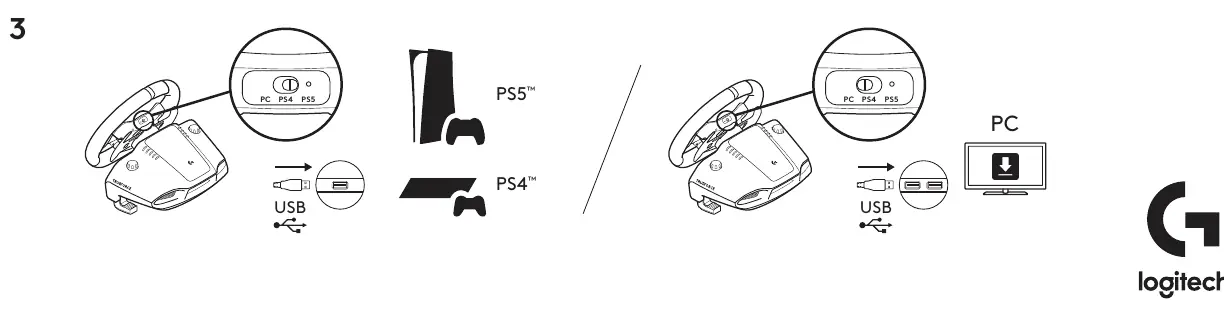
- Connect Pedals and Power: Plug the pedal unit cable into the port on the underside of the wheel base. Connect the power adapter to the wheel base and plug the power cable into a wall outlet.
- Cable Management: Route the cables through the cable management channels on the underside of the wheel base to keep them organized and secure.
- Connect to Device: Set the mode switch on the back of the wheel base to the correct position for your platform (PC, PS4, or PS5). Connect the USB cable from the wheel to your PC or console.
Manufacturer information
Logitech
Practical help
Common problems
Ensure the USB cable is securely connected and the mode switch on the back of the wheel is set to the correct platform (PC, PS4, or PS5).
Check that the pedal unit cable is fully inserted into the port on the underside of the wheel base.
Before use
- Ensure all cables are connected securely to the wheel base.
- Verify the mode switch is set to the correct platform (PC, PS4, or PS5).
- Ensure the power adapter is plugged into a wall outlet.
- Route cables through the management channels to prevent damage.

Manual page author
Michael Turner
Technical manual editor
Reviews PDF manuals for structure, safety notes, and practical product details so readers can find the right information quickly.