Logitech® UE TripleFi 15vm Noise-Isolating Earphones + Mic
Get started with your Logitech UE TripleFi 15vm noise-isolating earphones. Learn how to achieve the perfect fit, connect to your devices, manage cables, and maintain your audio equipment for optimal sound quality.
Table of contents
Product Overview
The Logitech UE TripleFi 15vm are high-performance noise-isolating earphones equipped with an integrated microphone, designed for clear audio and communication on mobile devices, tablets, and laptops.
Getting Started
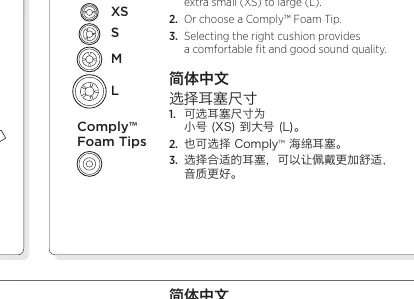
To ensure the best audio quality and comfort, start by selecting the appropriate ear cushion size from the included extra small (XS) to large (L) options, or use the Comply Foam Tips. Attach the chosen cushions to the earphone port tubes, ensuring they are pushed past the rib for a secure fit.
Connecting Your Device
For most tablets and smartphones, connect the earphones directly to the 3.5 mm headphone jack. If you experience issues with bass or voice clarity, use the included smartphone adapter. For laptop video chats, use the Y-cable adapter to connect both the headphone and microphone jacks. An airplane sound attenuator is provided to reduce loud background noise during travel.
Wearing and Usage
Wrap the cable around your ear for a secure fit. Insert the earphone marked R into your right ear and L into your left ear. Use the included garment clip to secure the cable to your clothing. For mobile phone calls, use the integrated call button to answer and end calls.
Cable Management
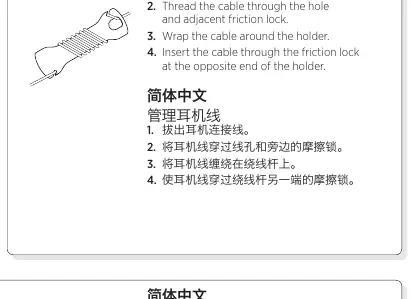
To store your earphones, unplug the cable, thread it through the holder's hole and friction lock, wrap it around the holder, and secure it at the opposite end. Always store the earphones in the provided protective case.
Maintenance and Cleaning
Keep your earphones in top condition by removing the cushions and wiping them with a clean cloth. Use the provided cleaning tool to keep the port tube clear, taking care not to touch the acoustic filter located at the back of the port tube.
Troubleshooting
- No sound or weak sound: Ensure the 3.5 mm connector is fully inserted and check volume settings. Use the smartphone adapter if necessary.
- Mic not working: Press the call button and check the cable switch settings.
- Weak bass: Check the ear cushion seal and try a different size.
- Diminished sound quality: Clean the port tube and ensure it is not blocked.

Manual page author
Michael Turner
Technical manual editor
Reviews PDF manuals for structure, safety notes, and practical product details so readers can find the right information quickly.