User Manual for Luceco 20W Telescopic Tripod
Quick guide for the Luceco 20W Telescopic Tripod. Learn about light modes, battery charging, technical specifications, and warranty information.
Quick answers from the manual
Quick answer
- The Luceco 20W Telescopic Tripod features three light modes (100%, 50%, 25%) controlled by a single switch and is charged via a Type-C port. p. 1
Key actions
- Cycle through light modes by pressing the switch: 1 click (100%), 2 clicks (50%), 3 clicks (25%). p. 1
Technical specifications
| Parameter | Value | Meaning | Pages |
|---|---|---|---|
| Battery | 3.7V Li-ion, 4000mAh | Internal rechargeable battery capacity. | p. 1 |
| Charging Voltage | DC 5V | Required input voltage for charging. | p. 1 |
Where to find it in the PDF
- Product Features and Specifications p. 1
Table of contents
Quick guide from the manual
The Luceco 20W Telescopic Tripod is a portable work light featuring an adjustable head, heavy-duty aluminum and PC housing, and a fully collapsible design for compact storage. It is powered by a rechargeable 3.7V Li-ion battery and charges via a Type-C port.
Operating instructions
The light is controlled by a single waterproof switch. Cycle through the three available light modes by pressing the switch:
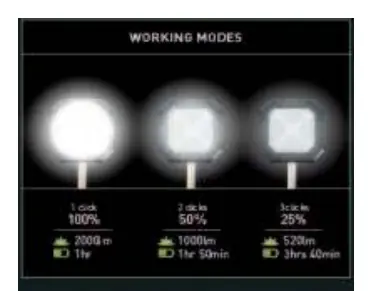
- 1 click: 100% brightness (2000lm, 1 hour runtime)
- 2 clicks: 50% brightness (1000lm, 1 hour 50 minutes runtime)
- 3 clicks: 25% brightness (500lm, 3 hours 40 minutes runtime)
Technical specifications
- Battery: 3.7V Li-ion, 4000mAh
- Charging Voltage: DC 5V
- Charging Port: Type-C
Warranty and support
The product is covered by a 3-year warranty against defects in material and workmanship. For technical support, contact the Luceco Tech Help Line:
- UK: 0330 0249 279
- Non-UK: +44 (0)1952 238 100
Practical help
Common problems
Ensure the battery is fully charged using a 5V DC power source via the Type-C charging port.
Before use
- Fully charge the battery before first use.
- Inspect the tripod for any shipping damage.
- Ensure the charging port is clean and free of debris.

Manual page author
Michael Turner
Technical manual editor
Reviews PDF manuals for structure, safety notes, and practical product details so readers can find the right information quickly.