Owner's Manual for Magnavox 13MT143S, 20MT133S, 20MS233S Color Television
Quick guide for Magnavox 13MT143S, 20MT133S, and 20MS233S color televisions. Includes setup, connection instructions, SmartLock parental controls, and troubleshooting.
Table of contents
Manual images
Click an image to enlargeQuick guide from the manual
This manual provides instructions for the Magnavox 13MT143S, 20MT133S, and 20MS233S color televisions. Key features include SmartLock parental controls, SmartPicture settings, and SmartSound volume leveling. If you encounter issues, check the troubleshooting section before calling for service.
Safety Instructions
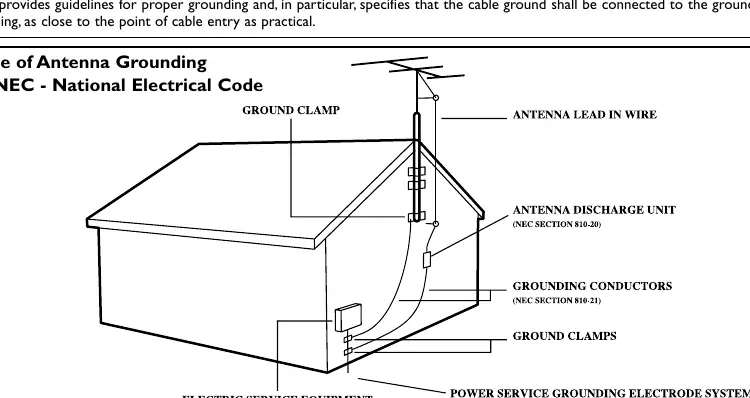
Read all instructions before operating the equipment. Ensure the TV is not placed near water or heat sources. Do not block ventilation openings. Use only manufacturer-specified attachments. If the power cord or plug is damaged, or if liquid/objects enter the unit, refer servicing to qualified personnel. Ensure the antenna system is properly grounded according to the National Electrical Code.
Connections
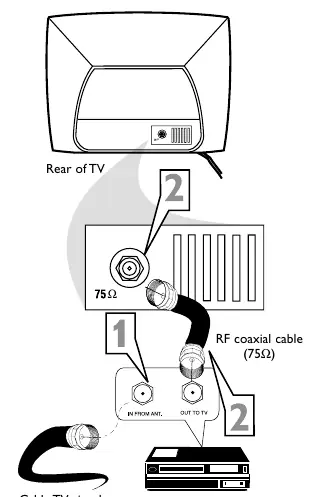
Cable TV: If using a single cable, connect it directly to the 75 ohm jack on the TV. If using a Cable Box, connect the cable to the box IN jack, then connect the box OUT jack to the TV's 75 ohm jack using an RF coaxial cable.
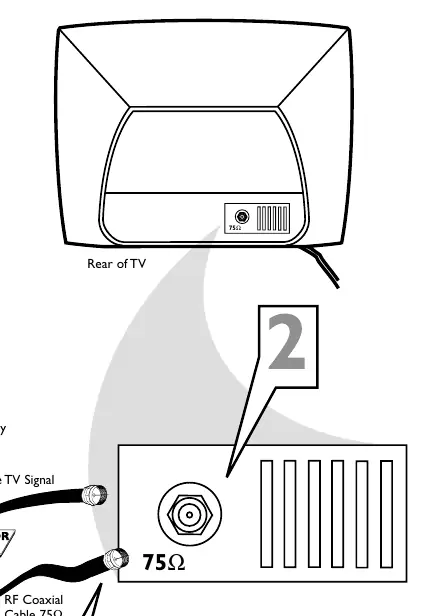
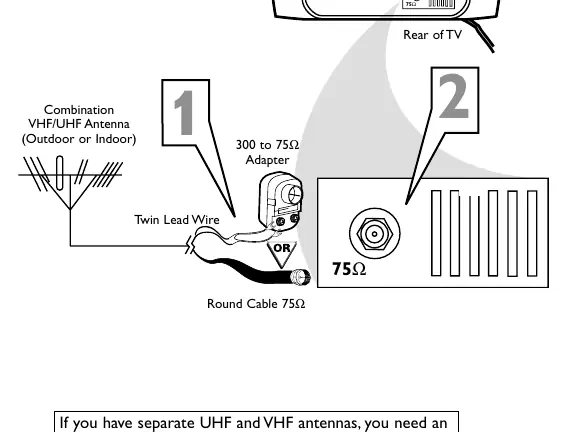
Antenna: Connect a round 75 ohm antenna cable directly to the 75 ohm jack. If using flat 300 ohm twin-lead wire, attach it to a 300 to 75 ohm adapter (not supplied) before connecting to the TV.
VCR/Accessory: Connect the antenna/cable to the accessory IN jack. Connect the accessory OUT jack to the TV's 75 ohm jack. For A/V connections, use the Audio/Video In jacks on the front of the TV.
Remote Control and Basic Operation
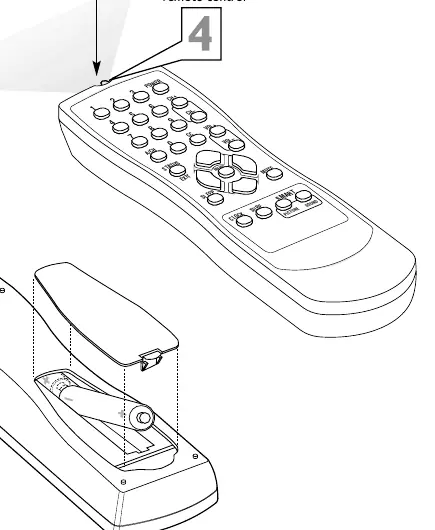
Point the remote toward the sensor on the front of the TV. Use the POWER button to turn the TV on/off. Use VOLUME +/- to adjust sound and CHANNEL +/- to change channels. Press both VOLUME buttons simultaneously to access the on-screen menu.
Setup Menus
Access the menu by pressing MENU. Use the cursor buttons to navigate to SETUP. From here, you can:
- Language: Set the menu language to English or Spanish.
- Cable TV Control: Set to YES if using cable, NO if using an antenna.
- Auto Program: Automatically scan and memorize available channels.
- Channel Edit: Manually save or delete channels from the TV's memory.
SmartLock Parental Controls
SmartLock allows you to block programming based on ratings. To use this feature, you must set an access code (default is 0711). You can block specific Movie Ratings (G, PG, PG-13, R, NC-17, X) or TV Ratings (TV-Y, TV-Y7, TV-G, TV-PG, TV-14, TV-MA). You can also block unrated programs or programs with no ratings.
Troubleshooting
If the TV has no power, check the power cord and wall outlet. If there is no picture, verify the antenna/cable connection and ensure the CABLE setting is correct. If the remote is not working, check the batteries and ensure the sensor is clean. If you forget your access code, use the default code 0711 to access the SmartLock menu and set a new one.
Practical help
Common problems
Check the power cord connection, ensure the wall outlet is active, and check for a tripped circuit breaker or blown fuse.
Verify the antenna/cable connection to the 75 ohm jack, ensure the CABLE setting (YES/NO) is correct, and run Auto Program.
Check the volume level and ensure the MUTE function is not active.
Replace batteries with new AA batteries, point the remote directly at the sensor, and clean the remote sensor on the TV.
Use the default code 0711 to enter the SmartLock feature and set a new personal access code.
Before use
- Check antenna or cable connection to the 75 ohm jack.
- Install two AA batteries in the remote control.
- Set the correct CABLE setting (YES/NO) in the setup menu.
- Run Auto Program to scan for available channels in your area.
Specs in practice
- SmartPicture
- Preset picture settings (Personal, Movies, Sports, Weak Signal) to optimize color, tint, and contrast.
Images and diagrams
- Antenna Grounding: Shows how to ground an outdoor antenna system according to NEC standards.
- Cable Connection: Illustrates connecting a cable box or direct cable to the 75 ohm jack.
- VCR Connection: Shows how to connect a VCR using RF coaxial or A/V cables.
Model compatibility
- The 20MS233S model includes stereo sound capabilities.
- Some features like SmartLock require an access code (default 0711).

Manual page author
Emily Carter
User documentation editor
Prepares concise manual descriptions and highlights the most useful setup, operation, and maintenance information for readers.