User manual for Oki SB MEDIA PLAYER 1G remote control
Quick guide for the Oki SB MEDIA PLAYER 1G replacement remote control. View the button mapping between the original remote and the Mandis replacement unit.
Table of contents
Quick guide from the manual
This document serves as a button mapping guide for the Mandis replacement remote control designed for the Oki SB MEDIA PLAYER 1G. It allows you to identify which button on your new replacement remote corresponds to the functions on your original remote.
Button Mapping Overview
The guide consists of tables comparing the Original remote buttons with the Rechange (replacement) remote buttons. Locate the function you wish to use in the "Original" column and press the corresponding button indicated in the "Rechange" column.
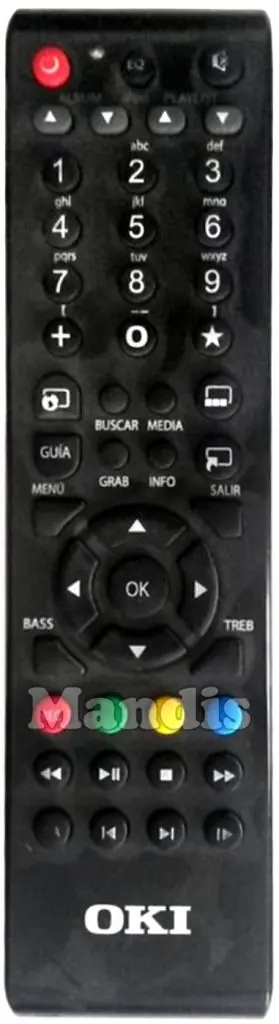
Key Functions
- Power: Power button.
- Volume Control: Use Vol + and Vol - buttons.
- Channel Control: Use Ch + and Ch - buttons.
- Navigation: Use the directional arrows (Up, Down, Left, Right) and OK button.
- Playback: Use standard Play, Pause, Stop, Fast Forward, and Rewind buttons.
- Menu/Info: Use the dedicated Menu, Info, and Exit buttons.
Using the Replacement Remote
If a specific function from your original remote is not immediately obvious, refer to the mapping tables provided in this guide. Some buttons may have dual functions or require the use of a "Shift" key to access secondary features.
Manufacturer information
Mandis
Practical help
Common problems
Ensure the batteries are fresh and the remote is pointed directly at the device IR receiver.
Refer to the mapping table in this guide to find the correct button on the replacement remote for the desired function.
Before use
- Check battery polarity.
- Verify the device model matches Oki SB MEDIA PLAYER 1G.
- Ensure line of sight to the device IR receiver.

Manual page author
David Miller
Documentation analyst
Organizes user manual content into clear summaries, with attention to model details, product context, and everyday usability.