BLACK+DECKER Mill & Brew 12-Cup Programmable Coffee Maker User Guide
Quick guide for the BLACK+DECKER Mill & Brew 12-Cup Programmable Coffee Maker (CM5000). Includes setup, programming, brewing instructions, cleaning, and troubleshooting.
Table of contents
Manual images
Jump to the sectionQuick guide from the manual
This document provides instructions for the BLACK+DECKER Mill & Brew 12-Cup Programmable Coffee Maker (CM5000). Before first use, clean the carafe, brew basket, grinder/filter basket, and showerhead. Run two full brewing cycles with water only (no coffee) to clean the internal components. Always ensure the grinder lid is securely snapped into place, as the unit will not operate otherwise.
Programming
Setting the Clock: Plug in the unit, press HR to set the hour (note PM indicator), and press MIN to set the minutes.
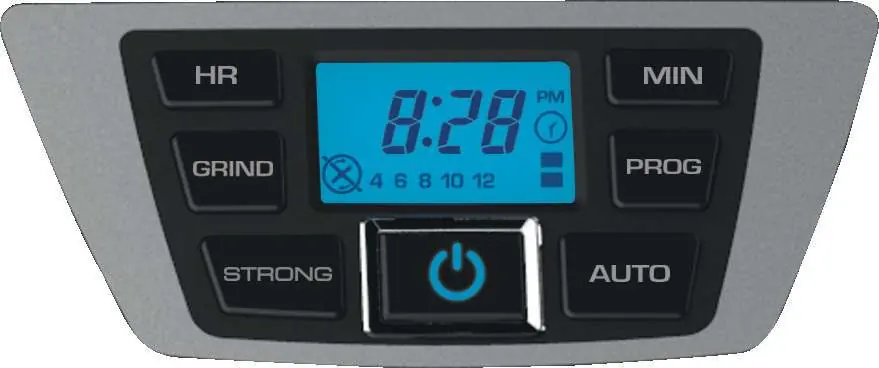
Auto Brew: After setting the clock, press PROG. Use HR and MIN to set the desired start time. Press AUTO to activate; the timer icon will remain solid.
Auto-Shutoff: Press and hold PROG for 3 seconds. Use MIN to toggle between 00, 30, 60, 90, and 120 minutes. Press PROG to lock in the setting.
Brew Strength: Press the STRONG button to cycle through settings: no bars (regular), 1 bar (strong), or 2 bars (bold).
Brewing Coffee
- Fill the carafe with fresh, cold water (max 12 cups) and pour into the reservoir.
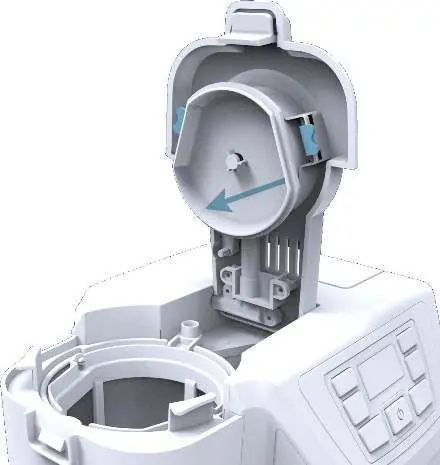
- Open the grinder lid and add coffee beans to the 2-in-1 basket.
- Secure the grinder lid until it clicks.
- Press GRIND to select the number of cups (4, 6, 8, 10, 12) or select the grinder OFF symbol for pre-ground coffee.
- Press the Power button to start the cycle.
Care and Cleaning
Clean the unit after every use. The carafe and brew basket are top-rack dishwasher safe. Hand-wash the showerhead and grinder/filter basket in warm, soapy water. Perform a deep cleaning with vinegar once a month to remove mineral buildup.
Troubleshooting
If the coffee maker does not turn on, check the power connection. If it leaks, ensure the reservoir is not overfilled and the carafe is correctly positioned. If the brew basket overflows, ensure the carafe is replaced within 20 seconds when using the Sneak-A-Cup feature, or reduce the amount of coffee used.
Practical help
Common problems
Ensure the appliance is plugged into a working outlet.
Check that the water reservoir is not filled beyond the 12-cup MAX line and the carafe is placed correctly.
Replace the carafe within 20 seconds when using Sneak-A-Cup, reduce the amount of coffee, or use a coarser grind.
The grinder may be overheated. Let it cool for 15 minutes and unplug the unit for at least 30 seconds to reset the fuse.
Before use
- Unpack and remove all packaging materials and stickers.
- Wash the glass carafe, brew basket, grinder/filter basket, and showerhead in warm, soapy water.
- Run two full brewing cycles with water only to clean the internal system.
- Discard the water after each cleaning cycle.
- Allow the unit to cool for 15 minutes between cleaning cycles.
Specs in practice
- 12-Cup Capacity
- Maximum water capacity for the reservoir.
- Adjustable Auto-Shutoff
- Programmable keep-warm time from 0 to 120 minutes.
Images and diagrams
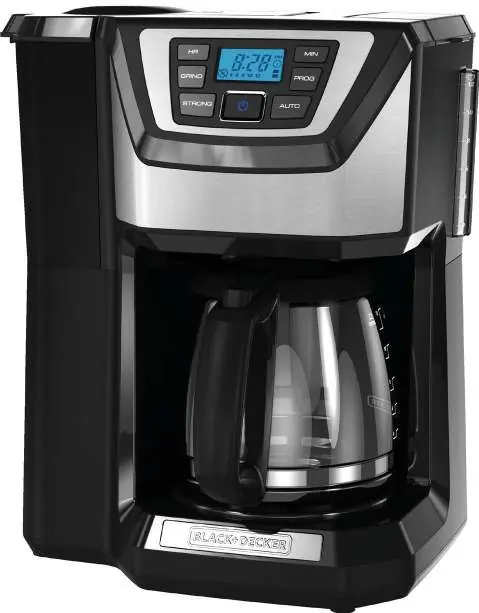
- The control panel features buttons for HR, MIN, GRIND, PROG, STRONG, and AUTO.
- The LCD display shows the current time, delay start status, grind settings, and brew strength.
- The grinder lid must be closed and snapped into place for the unit to operate.
Model compatibility
- Intended for household use only.
- Grinder is designed for coffee beans only; do not grind spices or other food products.
- Use spring or filtered water; distilled water lacks minerals necessary for optimal extraction.

Manual page author
Michael Turner
Technical manual editor
Reviews PDF manuals for structure, safety notes, and practical product details so readers can find the right information quickly.