User Manual for Minolta Capios 140A / 160A Camera
Comprehensive user guide for the Minolta Capios 140A and 160A 35mm film cameras. Includes instructions on battery installation, film loading, autofocus modes, flash settings, remote operation, and troubleshooting.
Table of contents
Quick Guide from the Manual
The Minolta Capios 140A and 160A are 35mm lens-shutter cameras. To start shooting: 1. Press the main switch to turn on the power. 2. Check the battery level on the LCD. 3. Load the 35mm film. 4. Use the zoom lever to frame your subject. 5. Ensure the subject is within the Area AF frame and press the shutter button.
Camera Parts
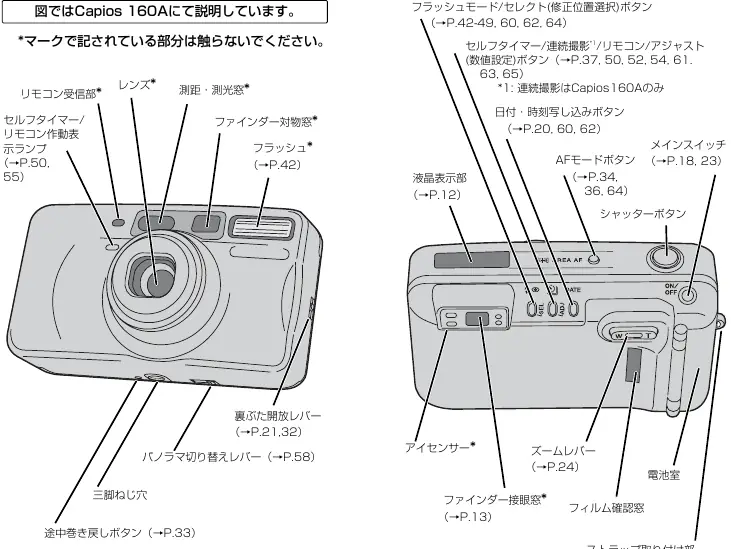
Key components include the lens, flash, AF/metering windows, viewfinder, zoom lever, and the main switch. The LCD panel displays battery status, film counter, flash mode, and AF mode. The camera uses an 'Eye-Start' system that prepares focus and exposure when you look through the viewfinder.
Film Loading
Open the back cover using the release lever. Insert the film cartridge and pull the film tip to the 'FILM TIP' mark. Close the back cover; the camera will automatically advance the film to the first frame. If the film counter does not advance, open the back and reload.
Autofocus Modes
The camera offers three AF modes, selectable via the AF mode button:
- Area AF: Standard mode for most scenes.
- Spot AF: Focuses on the center area, useful for difficult subjects.
- Target AF: Tracks moving subjects while the shutter button is half-pressed.
Flash Settings
Press the flash mode button to cycle through options:
- Auto: Fires automatically in low light or backlight.
- Red-eye Reduction: Pre-flashes to reduce red-eye effect.
- Forced Flash: Always fires.
- Flash Off: Disables flash.
- Night Portrait: Slow shutter speed with flash.
- +1.5EV Exposure Compensation: Available on Capios 160A for bright subjects.
Remote Control
The included IR remote (RC-3) allows for remote shutter release. Use the 2s button for a 2-second delay or the shutter button for immediate release. Ensure the remote is pointed at the camera's sensor.
Maintenance and Troubleshooting
Keep the lens and AF windows clean using a blower brush or soft cloth. Do not use organic solvents like thinner or benzene. If the camera stops working, check the battery orientation and film loading. If the shutter won't fire, ensure the flash has finished charging (indicated by a solid orange light).
Practical help
Common problems
Check if the battery is inserted correctly, film is loaded properly, or if the flash is still charging (wait for the orange light to stop blinking).
Ensure the subject is within the minimum focus distance, avoid blocking the AF/metering windows with fingers, and use a tripod if the orange light blinks slowly (indicating slow shutter speed).
In Auto mode, the flash only fires when necessary. If you want the flash to fire, switch to Forced Flash mode.
Ensure the date/time is set correctly after battery replacement. If the display is blinking, the date is not set.
Before use
- Insert a fresh 3V CR123A or DL123A lithium battery.
- Check that the film is loaded correctly and the counter has advanced.
- Clean the lens and AF/metering windows with a soft cloth.
- Ensure fingers or straps are not covering the lens or AF windows.
- Verify the camera is set to the desired AF and Flash mode.
Specs in practice
- Flash Charging
- Takes approximately 0.5 to 6.5 seconds to charge.
Images and diagrams
- The parts diagram on page 6 identifies the remote sensor, lens, AF windows, and various control buttons.
- The basic shooting flow on page 8 illustrates the step-by-step process from power-on to film removal.
- The battery replacement diagram on page 10 shows how to open the battery compartment using the strap protrusion.
Model compatibility
- Capios 160A includes specific features like +1.5EV exposure compensation and continuous shooting not found on the 140A.
- Remote control RC-3 is compatible with both models.

Manual page author
David Miller
Documentation analyst
Organizes user manual content into clear summaries, with attention to model details, product context, and everyday usability.