Mirka LEROS(-S) Wall Sander
Professional wall sander for efficient, dust-free sanding of various surfaces. Features adjustable speed, ergonomic design, and Bluetooth connectivity.
Table of contents
Product Overview
The Mirka LEROS(-S) is a professional-grade, hand-held wall sander designed for efficient sanding of various materials, including wood, metal, stone, and plastics. It is engineered for optimal performance when used with Mirka net sanding products and a compatible dust extraction unit, providing a dust-free sanding solution.
Safety Information
Always wear required personal protective equipment, including safety glasses, ear protection, safety gloves, and a face mask. Ensure the work area is clean and well-lit. Do not operate the tool in explosive atmospheres. Always disconnect the power supply before performing any maintenance or changing accessories. Repairs must only be performed by authorized service personnel using original Mirka spare parts.
Getting Started
Upon unpacking, ensure the tool is intact and undamaged. Before use, verify that the backing pad is correctly attached and tightened. Connect the power cord to a grounded outlet (100-240 VAC). For maximum efficiency, connect the sander to a Mirka dust extractor, which allows for the tool's autostart function.
Operation
The sander is designed for hand-held operation in any position. Always place the tool on the work surface before starting and remove it before stopping to prevent surface gouging. Use the speed control buttons to adjust the operating speed between 4,000 and 8,000 rpm. The multi-purpose LED indicates the tool's status, including power connection, active operation, and temperature warnings.
Maintenance
Regularly clean the dust extractor's collection bag to ensure optimal performance. To replace the backing pad, remove the hole screws, the interface, and the cover cap, then unscrew the pad. The brake seal can be replaced by removing the backing pad and pulling the old seal from its groove. Always keep the cooling air vents clean to ensure proper air circulation.
Troubleshooting
If the tool malfunctions, check the power connection and the main fuse. If the multi-purpose LED flashes red and green, ensure the tool is connected to the correct voltage. If the tool slows down due to high temperature, reduce the load and allow it to cool down.
Disposal
Dispose of the tool in accordance with local regulations. In the EU, do not dispose of electric tools with household waste; they must be collected separately and taken to an environmentally compatible recycling facility.
Practical help
Common problems
Connect the sander to a mains outlet that corresponds with the nominal voltage of the tool.
Check the power cord connection and the main fuse in the power supply.
Reduce the load on the sander for some time to allow it to speed up again.
The tool is in safety mode due to high temperature; wait until it has cooled down.
Before use
- Ensure the tool is intact and undamaged
- Verify the backing pad is correctly attached and tightened
- Connect the power cord to a grounded outlet
- Ensure the abrasive is centered on the backing pad
- Check that the dust extraction system is properly connected
Specs in practice
- Backing pad size
- Diameter of the sanding pad, which is 225 mm.
Images and diagrams
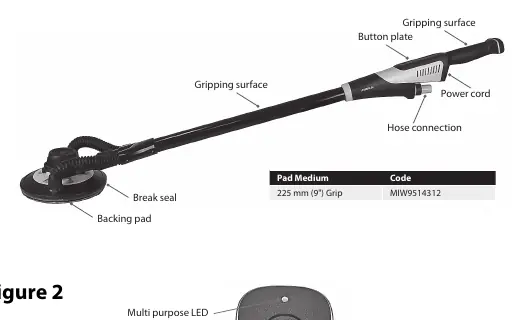
- Figure 1 shows the main components: backing pad, hose connection, power cord, and button plate.
- Figure 2 illustrates the control panel, including the On/Off button, speed adjustment buttons, and the multi-purpose LED indicator.
Model compatibility
- Use only original Mirka backing pads.
- Use only an original Mirka power supply cable.
- Recommended for use with Mirka dust extractors and net sanding products.

Manual page author
David Miller
Documentation analyst
Organizes user manual content into clear summaries, with attention to model details, product context, and everyday usability.