User Manual for MOJOGEAR Charge+ 140W GaN Charger
Quick guide for the MOJOGEAR Charge+ 140W GaN Charger (MG-C02 PD-577). Learn how to use the ports, understand output combinations, and follow safety guidelines.
Table of contents
Quick guide from the manual
To use the MOJOGEAR Charge+ 140W GaN Charger, follow these steps:
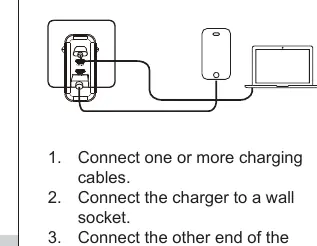
- Connect one or more charging cables to the charger.
- Plug the charger into a wall socket.
- Connect the other end of the charging cable to your laptop, smartphone, or other device.
Charging recommendations
For charging laptops, please use the USB-C1 or USB-C2 ports. These ports always support the highest output.
Technical details
The charger supports a wide range of power outputs depending on the connected devices:
- USB-C1/C2 Output: Up to 140W Max (supports PPS).
- USB-C3 Output: Up to 20W Max.
- USB-A Output: Up to 18W Max.
- Total Output: 140W Max.
Safety instructions
- Do not drop, disassemble, or mechanically abuse the charger.
- Do not attempt to repair the charger yourself.
- Avoid exposure to water or high humidity.
- Do not expose to excessive heat.
- Do not use near flammable gases.
- Keep out of reach of children.
Support
All MOJOGEAR products are covered by a 2-year warranty. For questions or feedback, contact support at [email protected].
Practical help
Common problems
Ensure you are using the USB-C1 or USB-C2 ports, as these support the highest output.
Check if multiple devices are connected, as the total power output is distributed across ports.
Before use
- Check that the charger is not damaged
- Ensure the wall socket is compatible (100-240V)
- Use appropriate charging cables for your devices

Manual page author
Michael Turner
Technical manual editor
Reviews PDF manuals for structure, safety notes, and practical product details so readers can find the right information quickly.