Moultrie GameSpy I45s Digital Camera Instructions
Comprehensive user guide for the Moultrie GameSpy I45s digital trail camera, covering setup, operation, advanced settings, and technical specifications.
Table of contents
Product Overview
The Moultrie GameSpy I45s is a digital camera designed for wildlife monitoring. It features an integrated LCD display, SD memory card slot, USB port, and TV output. The device is powered by four D-cell alkaline batteries and includes internal motion sensors for automatic image and video capture.
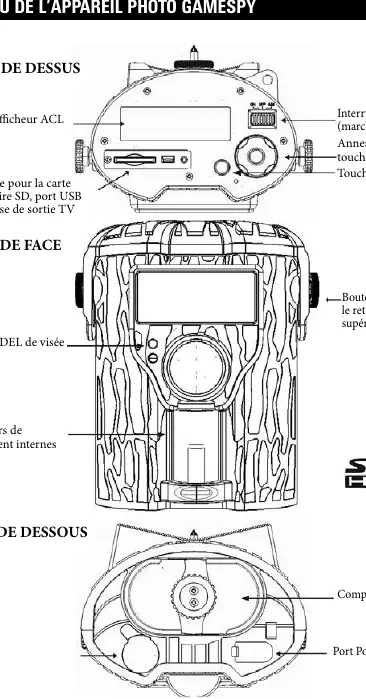
Getting Started
To begin using your camera:
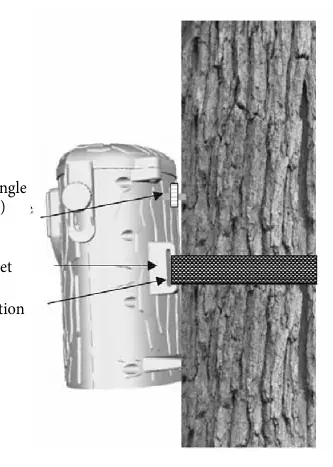
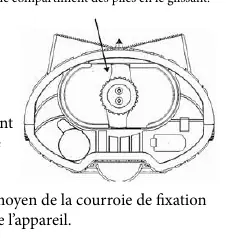
- Insert four D-cell alkaline batteries into the battery compartment, ensuring correct polarity.
- Secure the camera to a tree or post using the provided mounting strap through the rear eyelets.
- Set the power switch to the ON position.
- Use the MODE button to access settings, then use the scroll ring and ENTER key to configure the date, time, and operational preferences.
- Switch to AUTO mode to begin automatic monitoring.
Operation and Settings
The camera offers various customizable settings accessible via the menu:
- Capture Mode: Choose between Still (photo) or Video recording.
- Image Quality: Adjust resolution settings (Low, Medium, High, Enhanced).
- Photo Delay: Set the interval between captures (1, 5, 10, 30, or 60 minutes).
- Multi-Shot: Configure the camera to take 1, 2, or 3 photos per trigger.
- Video Settings: Adjust video resolution and duration (5, 15, or 30 seconds).
- Info Strip: Enable or disable the data overlay (temperature, moon phase, time, camera ID) on captured images.
Advanced Features
The camera supports optional accessories like the Moultrie PowerPanel and GameSpy connection devices for remote data transmission. Users can manage images via USB connection to a computer or by using an SD card (up to 16GB). The device also includes an IR Test mode to verify the motion detection field and a factory reset option to restore default settings.
Maintenance and Troubleshooting
Regularly check battery levels and ensure the SD card has sufficient storage. If the camera causes interference, try reorienting the receiving antenna or moving the device away from the receiver. For technical support, contact Moultrie customer service during business hours.