Installation Manual for One Light 12110H Lighting Fixture
Quick installation guide for the One Light 12110H lighting fixture. Includes mounting instructions, technical specifications, and safety warnings for professional installation.
Table of contents
Important Information
This document provides installation instructions for the One Light 12110H LED lighting fixture. Installation must be performed by a professional electrician to ensure safety and compliance with electrical standards.
Technical Specifications
- Voltage: 230V
- Power: 10W
- LED Type: SMD 3535
- IP Rating: IP20
- Driver: Complete with 700mA driver
- Material: Aluminium
- Dimensions: 72mm x 83mm
Installation Instructions
Follow these steps to install the fixture:
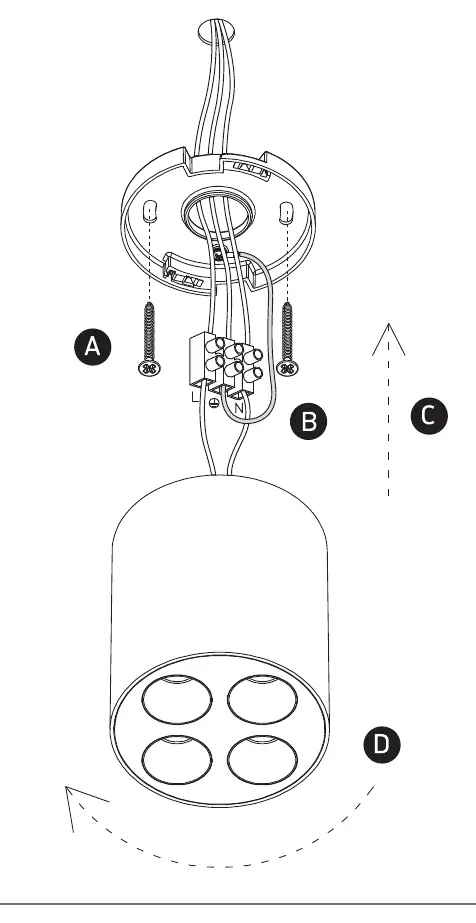
- Mounting: Secure the mounting bracket (A) to the ceiling surface.
- Wiring: Connect the power supply wires to the terminal block (B). Ensure the Live (L) and Neutral (N) connections are secure.
- Assembly: Attach the fixture body (D) to the mounting bracket.
Safety Warnings
- Do not cover the fitting.
- Ensure the product is installed properly before connecting to electricity.
- Maintenance and installation should only be carried out by a professional electrician.
Practical help
Common problems
Check electrical connections at the terminal block and ensure the 700mA driver is correctly wired.
Ensure the fitting is not covered by insulation or other materials.
Before use
- Ensure power is disconnected before starting installation
- Verify the mounting surface can support the fixture
- Confirm the 700mA driver is included and compatible
- Ensure a professional electrician is performing the installation

Manual page author
Emily Carter
User documentation editor
Prepares concise manual descriptions and highlights the most useful setup, operation, and maintenance information for readers.