User Manual for OnePlus 15R Smartphone
Quick guide for the OnePlus 15R smartphone. Includes device layout diagrams, button functions, camera placement, and essential battery management tips.
Table of contents
Manual images
Click an image to enlargeQuick Guide Overview
This guide provides a visual overview of the OnePlus 15R smartphone, detailing the location of buttons, sensors, and ports, as well as providing instructions for battery health management.
Front View Layout
The front of the device features the following components:
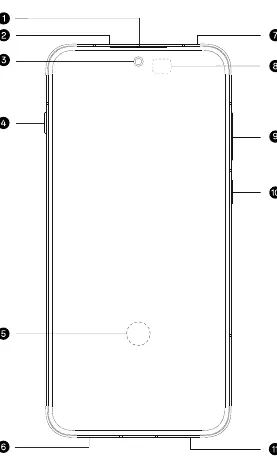
- Earpiece speaker
- Top speaker
- Front camera
- Volume button
- Ultrasonic fingerprint sensor (located on the screen)
- SIM card slot
- MIC
- Ambient light/proximity sensor
- Speaker
- Power button
- Bottom speaker
Back View Layout
The back of the device features the following components:
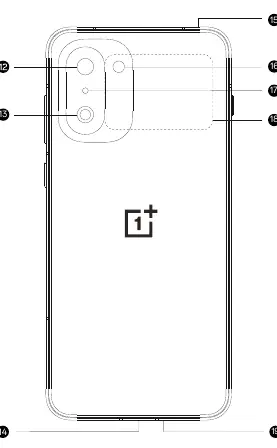
- Wide-angle camera
- Ultra-wide camera
- USB-C port
- Air pressure relief hole
- Flash
- Infrared sensor
- NFC
- MIC
Battery Management
You can monitor your battery health and usage statistics by dialing *#*#588#*#* on your device. This menu provides information on:
- Battery production date
- First usage date after initial setup
- Total charge and discharge cycle count
- Measured battery health status
Tips for battery longevity:
- Avoid frequent charging.
- Avoid prolonged charging when the battery level is already high.
- Avoid charging in high-temperature environments.
- Turn off wireless functions like Wi-Fi and Bluetooth when not in use to reduce standby power consumption.
- Enable "Smart Charging" and "High-power charging limit" in Settings - Battery options.
Important Notes
Due to environmental considerations, a charger is not included in the box. The device is compatible with most standard USB power adapters and USB-C cables.
Practical help
Common problems
Dial *#*#588#*#* to view battery production date, cycle count, and health status.
Avoid frequent charging, charging at high temperatures, and prolonged charging at high levels.
Before use
- Ensure you have a compatible USB-C cable and power adapter, as the charger is not included.
- Identify the SIM card slot location on the bottom of the device.
- Locate the power and volume buttons on the side of the device.
Specs in practice
- Ultrasonic fingerprint sensor
- Located on the screen for secure biometric authentication.
- Infrared sensor
- Located on the back for remote control functionality.
- Air pressure relief hole
- Located on the back to maintain internal pressure balance.
Images and diagrams
- The front view diagram identifies the earpiece, front camera, fingerprint sensor, and SIM slot.
- The back view diagram details the camera array, flash, NFC, and USB-C port.
Model compatibility
- Compatible with most USB power adapters and USB-C cables.

Manual page author
David Miller
Documentation analyst
Organizes user manual content into clear summaries, with attention to model details, product context, and everyday usability.