ONEPLUS 15R Smart Phone User Guide
Comprehensive user guide for the OnePlus 15R smartphone, covering device layout, battery management, and charging recommendations.
Table of contents
Device Overview
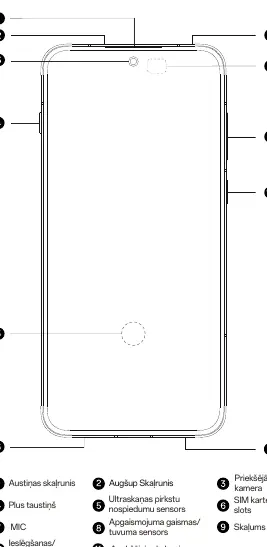
The OnePlus 15R is a modern smartphone designed for high performance. The front of the device features an earpiece speaker, front-facing camera, proximity and ambient light sensors, and an ultrasonic fingerprint sensor integrated into the display. The side edges house the volume buttons and the power button. The bottom edge contains the USB Type-C port, a microphone, and the main speaker.
Rear Components
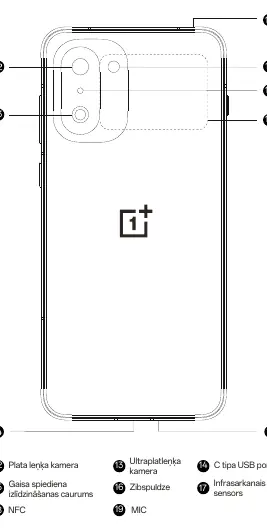
The back of the device is equipped with a sophisticated camera system, including a wide-angle camera and an ultra-wide-angle camera, accompanied by a flash. Additional features on the rear include an NFC antenna, an infrared sensor, and a pressure equalization hole to maintain device integrity.
Battery Management
To ensure the longevity and health of your battery, the OnePlus 15R includes advanced management tools. You can access detailed battery information by dialing *#*#588#*#* on your device. This menu provides data such as the battery manufacturing date, first usage date, total charge/discharge cycles, and current battery health status.
Optimizing Battery Life
- Avoid frequent charging: Try to maintain a balanced charging routine.
- Prevent overcharging: Avoid leaving the device connected to power for extended periods when the battery level is already high.
- Temperature control: Do not charge the device in high-temperature environments.
- Connectivity management: Turning off Wi-Fi and Bluetooth when not in use can reduce standby power consumption by approximately 20%.
- Smart features: Utilize the automatic smart charging feature and the high-power charging limit option found in the device settings.
Charging Information
In line with environmental sustainability efforts, a charger is not included in the box. The OnePlus 15R is compatible with most standard USB power adapters and cables featuring a USB Type-C connector.

Manual page author
David Miller
Documentation analyst
Organizes user manual content into clear summaries, with attention to model details, product context, and everyday usability.