Electronics / Cameras
Ozspy SPY PEN VIDEO CAMERA HD 1080P 8GB
Comprehensive user guide for the Ozspy 1080P Spy Pen Camera, covering charging, time setting, operation modes, and maintenance.
Table of contents
Product Overview
The Ozspy Spy Pen Video Camera is a high-tech, discreet recording device designed for capturing 1080P video and photos. It functions as a fully operational ballpoint pen while housing a hidden camera, microphone, and internal rechargeable battery. This device is ideal for professional or personal security needs, provided it is used in accordance with local laws and regulations.
Charging and Setup
Before using the device for the first time, it is essential to charge the internal lithium battery for a minimum of 4 hours using the provided USB cable connected to a power adapter. An orange LED will flash during the charging process and turn solid once the battery is fully charged. To ensure your video files have the correct timestamp, connect the pen to a computer via USB, create a file named TIME.TXT in the root directory, and input the current date and time in the format YYYY-MM-DD HH:MM:SS.
Operation Modes
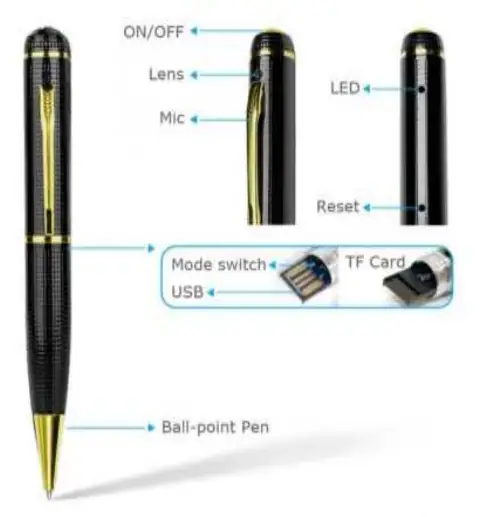
The device features two primary modes: Camera Mode and Video Mode. You can switch between these using the toggle switch located on the pen. To turn the device on, hold the ON/OFF button for 2 seconds. In Camera Mode, the device will flash orange slowly; pressing the button captures a photo, indicated by a blue flash. In Video Mode, the device will show a blue light when powered on; pressing the button once starts recording, indicated by an orange light, and pressing it again stops the recording.
Maintenance and Safety
The Spy Pen is a precision instrument that requires careful handling. It is normal for the device to become warm during operation; ensure the air vents are not blocked to allow for proper cooling. Keep the device dry at all times, as moisture can corrode internal circuits. Avoid dropping the pen or exposing it to harsh chemicals. If the device malfunctions, you can perform a soft reset by gently pressing the reset button inside the designated hole using a thin needle or toothpick.
Official resources from the manual
Manufacturer information
OzSpy Security Solutions
Practical help
Common problems
Device is malfunctioning or unresponsive
Gently press the reset button inside the reset hole using a thin needle or toothpick.
Device gets hot during use
This is normal, but ensure the air flow to the cover is not blocked to allow for proper cooling.
Before use
- Charge the battery for at least 4 hours before first use.
- Ensure the TF card is properly inserted.
- Set the correct date and time using the TIME.TXT file method.
- Check the mode switch position (Camera vs Video) before powering on.
Images and diagrams
- The device features an ON/OFF button, lens, and microphone at the top.
- The side of the pen contains the mode switch and USB port.
- The reset hole is located near the LED indicator.
- The bottom section functions as a standard ballpoint pen.
Model compatibility
- Compatible with standard USB ports for charging and file transfer.
- Requires a computer to set the time and view recorded files.

Manual page author
Michael Turner
Technical manual editor
Reviews PDF manuals for structure, safety notes, and practical product details so readers can find the right information quickly.