PDP Series X Dual Slim Charger User Guide
Quick guide for the PDP Series X Dual Slim Charger, including setup, charging status indicators, and compatibility details for Xbox Series X and Xbox One controllers.
Table of contents
Manual images
Jump to the sectionQuick guide from the manual
The PDP Series X Dual Slim Charger is a charging stand designed for Xbox Series X and Xbox One controllers. It features magnetic ports for secure connection and micro-suction material to keep the base stable. The system includes two rechargeable batteries and four battery doors to ensure compatibility with different controller models.
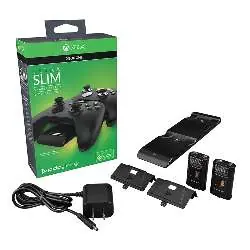
Device operation and charging
To charge your controllers, place them onto the magnetic ports of the charging stand. The system is designed to snap the controller into the optimal position automatically. The front of the unit features LED indicators that provide real-time feedback on the charging status:

- Moving LED: The controller is currently charging.
- Static LED: The controller is fully charged.
The charging station also includes auto-dimming lights that adjust to the surrounding environment to minimize glare in darker rooms.
Technical specifications
- Compatibility: Xbox Series X and Xbox One.
- Included accessories: 2 rechargeable batteries, 4 battery doors, power adapter.
- Dimensions: 208 mm (width) x 48 mm (depth) x 135 mm (height).
- Weight: 420 g.
- Color: Black.
Manufacturer information
PDP
Practical help
Common problems
Ensure the controller is properly aligned with the magnetic ports. The magnetic system should snap the controller into place for an optimal connection.
Before use
- Verify that you have both rechargeable batteries and the correct battery doors for your controller model.
- Place the charging stand on a flat, stable surface.
- Connect the power adapter to the charging stand and a power outlet.

Manual page author
Michael Turner
Technical manual editor
Reviews PDF manuals for structure, safety notes, and practical product details so readers can find the right information quickly.