User Manual for Philips Hue Turaco Outdoor Light
Quick guide for the Philips Hue Turaco outdoor light. Learn how to install, wire, and connect your smart outdoor lighting to the Hue bridge and app.
Table of contents
Manual images
Click an image to enlargeGetting Started
To begin using your Philips Hue Turaco outdoor light, visit the official setup website at www.meethue.com/getstarted. You will need the Hue App installed on your smartphone to configure and control your lighting system.
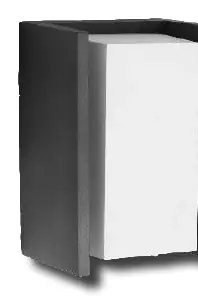
Installation and Wiring
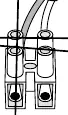
Ensure the main power supply is switched off before starting the installation. The device connects via a standard terminal block. Refer to the wiring diagrams provided in the manual to ensure correct connection of the live and neutral wires.
Connectivity and Range
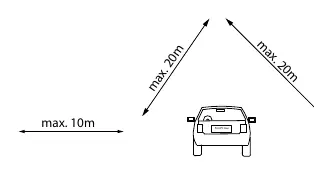
The Philips Hue system relies on a wireless mesh network. Ensure your light is within the effective range of your Hue Bridge or other Hue devices. The manual indicates a maximum range of 10m to 20m depending on the configuration and obstacles.
Support
For further assistance, contact the Philips Lighting Contact Centre. You can reach them via the website www.philips.com/homelighting or by phone at +800 7445 4775.
Official resources from the manual
Manufacturer information
Philips
Practical help
Common problems
Ensure the light is within the recommended range (max 20m) and that the Hue Bridge is powered on and connected to the network.
Verify that the wiring is securely connected to the terminal block and that the main power supply is active.
Before use
- Ensure the main power supply is turned off.
- Verify you have the Hue App installed on your smartphone.
- Check that the Hue Bridge is set up and connected to your router.
- Confirm the installation location is within range of the Hue network.

Manual page author
Michael Turner
Technical manual editor
Reviews PDF manuals for structure, safety notes, and practical product details so readers can find the right information quickly.