User Guide for Philips 22PFD5403/30 LED TV
Quick guide and technical specifications for the Philips 5400 series 22PFD5403/30 LED TV. Includes details on display features, connection ports, and mounting specifications.
PDF source: ZH · summary: English
Table of contents
Quick Guide
This document provides an overview of the Philips 5400 series 22PFD5403/30 LED TV. It highlights key features, connection options, and technical specifications to assist with setup and usage.
Key Features
- Pixel Precise HD: Enhances image quality for vivid and clear visuals.
- Full HD LED: Offers 1920 x 1080 resolution for high-contrast images.
- Connectivity: Includes 2 HDMI inputs with EasyLink support, allowing control of multiple devices (DVD, Blu-ray, set-top boxes) with a single remote.
- USB Playback: Supports viewing photos, videos, and music directly from USB memory sticks or other multimedia devices.
Connections
The TV features various ports for external devices:
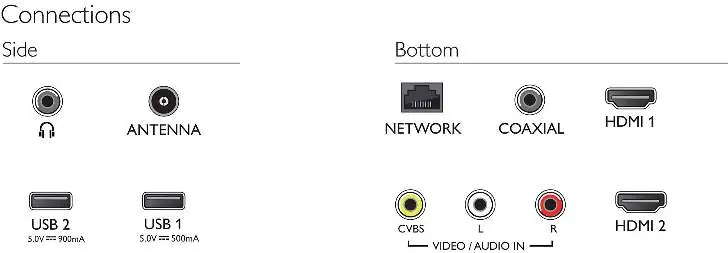
- Side: Headphone output and Antenna (IEC75) input.
- Bottom: Network (LAN RJ-45), Coaxial digital audio output, HDMI 1, HDMI 2, and Video/Audio input (CVBS, L/R).
- USB: Two USB ports are available for media playback.
Technical Specifications
- Display: 16:9 aspect ratio, 1920 x 1080 resolution.
- Tuner: Supports DTMB (Digital) and PAL (Analog).
- Power: 200-240V / 50Hz.
- Operating Temperature: 5°C to 35°C.
- Wall Mount Compatibility: 100mm.
- Dimensions (with stand): 512.3 x 318 x 110.3 mm.
- Weight (with stand): 2.52 kg.
Manufacturer information
Philips
Practical help
Common problems
Device not recognized via HDMI
Ensure the device is connected to one of the two HDMI ports and check if EasyLink is enabled for integrated control.
Media file not playing from USB
Ensure the file format is supported (Video: AVI, MKV, H264/MPEG-4 AVC, MPEG-1, MPEG-2, MPEG-4; Audio: AAC, MP3; Image: JPEG, PNG, BMP).
Before use
- Verify power supply is 200-240V / 50Hz.
- Ensure the antenna is connected to the IEC75 port.
- Check that the wall mount is compatible with the 100mm standard.
- Ensure the environment temperature is between 5°C and 35°C.

Manual page author
Michael Turner
Technical manual editor