User Manual for Philips Samondra Wall Light
Quick guide for installing and configuring the Philips Samondra wall light. Learn how to mount the fixture, connect wiring, and adjust the motion sensor settings.
Quick answers from the manual
Quick answer
- The Philips Samondra is an outdoor wall light with a motion sensor. Installation requires basic tools like a drill and screwdriver. Ensure power is off before starting. p. 2, 3
Key actions
- Mounting the fixture p. 3, 4
- Wiring the light p. 4
- Adjusting sensor settings p. 6
First start
- Turn off the main power supply before beginning installation. p. 3
Show 2 more answers Show less
Technical specifications
| Parameter | Value | Meaning | Pages |
|---|---|---|---|
| IP Rating | IP44 | Splash-proof | p. 2 |
Where to find it in the PDF
- Installation p. 3, 4, 5
- Sensor Settings p. 6
Table of contents
Manual images
Click an image to enlargeQuick guide from the manual
This manual provides instructions for the installation and configuration of the Philips Samondra wall light. Always ensure the main power supply is switched off at the circuit breaker before beginning any installation work.
Installation
Ensure you have the necessary tools: a drill, screwdriver, and wire cutter. The fixture is rated IP44, suitable for outdoor use.
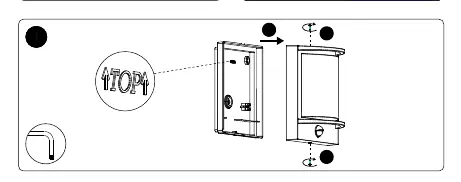
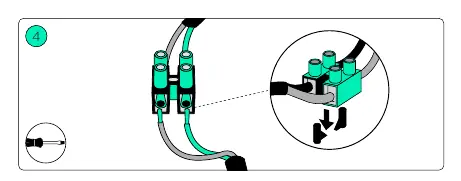
- Preparation: Mark the drilling holes using the backplate as a template. Drill the holes and insert the wall plugs.
- Wiring: Feed the power cable through the rubber grommet on the backplate.
- Connection: Connect the power wires to the terminal block inside the fixture. Ensure the connections are secure.
- Mounting: Secure the fixture to the wall using the provided screws.
Sensor Adjustment
The motion sensor settings can be adjusted on the unit:
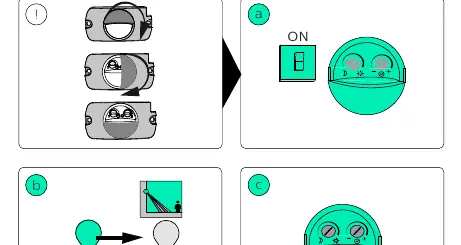
- Time: Adjust the duration the light stays on after motion is detected (between 5 seconds and 12 seconds).
- Sensitivity: Adjust the light sensitivity (day/night threshold) using the dial marked with sun and moon icons.
Manufacturer information
Philips
Practical help
Common problems
Light does not turn on
Check if the power is switched on at the circuit breaker.
Sensor not detecting motion
Check the sensitivity and time settings on the sensor dials.
Before use
- Ensure power is turned off at the main breaker
- Verify you have a drill, screwdriver, and wire cutter
- Check that the mounting surface is suitable for the screws

Manual page author
Emily Carter
User documentation editor