Porodo 120W Dual Output Car Charger PD-CCPD-BK
A quick guide to using the Porodo 120W Dual Output Car Charger (PD-CCPD-BK). Learn how to connect it to your vehicle, understand output specifications, and ensure compatibility with your devices.
Table of contents
Manual images
Click an image to enlargeQuick guide from the manual
This guide provides essential information for the Porodo 120W Dual Output Car Charger (model PD-CCPD-BK). Ensure your vehicle's power socket supports 12V-24V DC input before use.
Overview
The charger features two output ports and an indicator light:
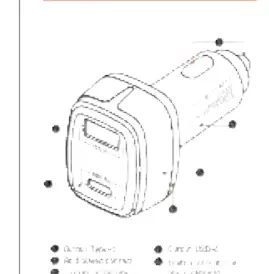
- Type-C Output: High-power port for fast charging.
- USB-A Output: Standard charging port.
- Blue LED Indicator: Illuminates when the charger is receiving power.
How to use
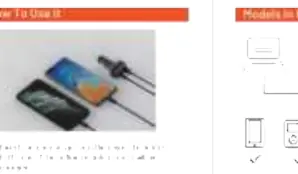
- Insert the car charger firmly into the vehicle's cigarette lighter socket.
- Verify that the blue indicator light is on, confirming the device is receiving power.
- Connect your mobile phone, tablet, or other USB-powered device using a compatible charging cable to the appropriate port (Type-C or USB-A).
Specifications
- Model: PD-CCPD-BK
- Input Voltage: DC 12V-24V
- USB-A Output: 20W (5V/3A, 9V/2A, 12V/1.5A)
- Type-C Output: 100W (5V/3A, 9V/3A, 12V/3A, 15V/3A, 20V/5A)
- Total Output Power: 120W (Max)
- Material: ABS+PC
Compatibility
The charger is designed for use in general vehicles with 12V-24V power systems. It is compatible with a wide range of devices including smartphones, tablets, and other USB-powered electronics.
Practical help
Common problems
Ensure the charger is fully inserted into the cigarette lighter socket and the blue indicator light is on.
Before use
- Check if your vehicle's cigarette lighter socket provides 12V-24V DC power.
- Ensure you have the correct USB-A or Type-C charging cable for your device.

Manual page author
David Miller
Documentation analyst
Organizes user manual content into clear summaries, with attention to model details, product context, and everyday usability.