User Manual for D-Link 10000mAh Power Bank DPP-101
Quick start guide for the D-Link 10000mAh Power Bank (DPP-101). Learn how to charge your devices, check battery status, and understand port specifications.
Table of contents
Manual images
Click an image to enlargeQuick guide from the manual
This document provides essential instructions for operating the D-Link 10000mAh Power Bank (DPP-101). It covers the basic setup, charging procedures for the power bank, and how to charge your mobile devices using the available ports.
Device Overview
The power bank is equipped with the following components:
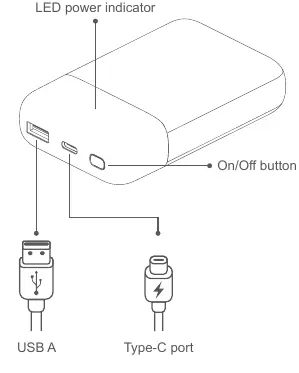
- On/Off button: Used to activate the power bank.
- LED power indicator: Displays the status of the power bank.
- USB-A port: Output port for charging devices.
- Type-C port: Input/Output port for charging the power bank or devices.
Charging Instructions
Charging the Power Bank: Connect the power bank to a wall adapter or power source using the USB-C port.
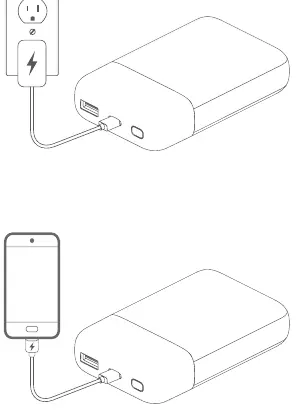
Charging Your Devices: Connect your mobile device to either the USB-A or USB-C port on the power bank to begin charging.
Technical Specifications
- Battery Capacity: 10,000mAh
- Input: USB-C 18W
- Output Single Port: USB-C 18W, USB-A 18W
- Output Dual Ports: USB-C 15W
- Dimensions: 105 x 72 x 23mm
Practical help
Common problems
Ensure the cable is securely connected to both the power bank and your device. Try using a different cable if the issue persists.
Ensure the wall adapter used for the USB-C input is functional and provides sufficient power.
Before use
- Ensure the power bank is fully charged before the first use.
- Verify that you are using a compatible USB cable for your device.
- Check the LED indicator to confirm the power bank is active.

Manual page author
David Miller
Documentation analyst
Organizes user manual content into clear summaries, with attention to model details, product context, and everyday usability.