User Guide for pTron Fusion RB 18W Bluetooth Soundbar
Quick start guide for pTron Fusion RB 18W Bluetooth Soundbar, covering pairing, TWS setup, playback modes, charging, and troubleshooting.
Table of contents
Manual images
Jump to the sectionQuick guide from the manual
The pTron Fusion RB soundbar is a versatile audio device featuring Bluetooth 5.3, FM radio, and support for TF/USB playback. The device is set to 60% volume by default. Ensure you use a 5V/1A power source for charging to avoid damaging the battery.
Powering and Pairing
- Power On/Off: Use the sliding switch on the speaker.
- Bluetooth Pairing: Turn on the speaker, search for 'pT Soundbar' on your device, and connect. It will automatically reconnect to the last paired device within 10 meters.
Playback Modes
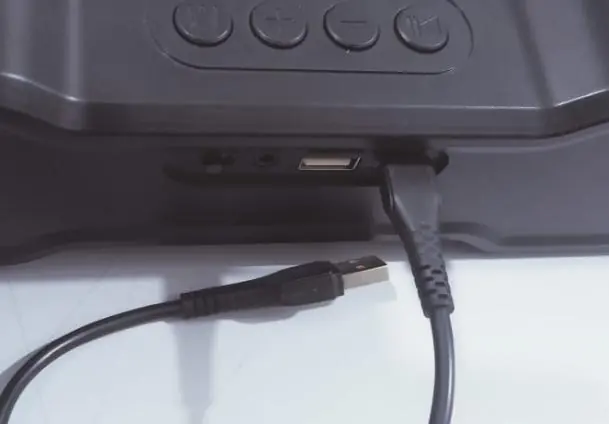
- AUX Mode: Connect via a 3.5mm aux cable.
- TF/USB Mode: Insert a TF card or USB drive (up to 32GB) to automatically activate the respective mode.
- FM Mode: Press the 'M' button to switch to FM. Important: The charging cable must be connected as it acts as an FM antenna. Use the Play/Pause button to search for channels.
Control Panel Functions
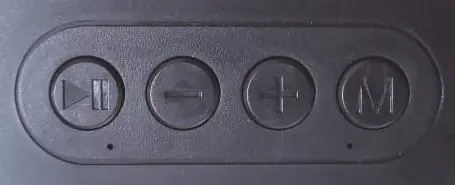
- Play/Pause: Single press for play/pause, double press to redial the last number, long press for TWS mode.
- Minus (-): Single press for previous song, long press to decrease volume.
- Plus (+): Single press for next song, long press to increase volume.
- Mode (M): Single press to change modes, long press to change or turn off LED light effects.
TWS Connection
To connect two speakers simultaneously:
- Turn on both speakers within 1 meter of each other.
- Long-press the Play/Pause button on one speaker.
- Search for 'pT Soundbar' on your phone and connect.
- To disconnect, press the Play/Pause button.
Charging
Connect the USB Type-C cable to the speaker and a 5V/1A power source. The LED indicator glows during charging and turns off when fully charged.
Safety Precautions
- Keep away from extreme heat, humidity, and corrosive environments.
- Use only the provided USB cable or a high-quality 5V/1A charger.
- Do not overcharge the battery.
- Do not open or tamper with the device.
Practical help
Common problems
Turn off the speaker, charge to 100%, unpair from your phone, restart your phone, and pair again.
Check for equalizer settings on the source device, remove obstacles between devices, and ensure the speaker is sufficiently charged.
Ensure the charging cable is plugged in, as it functions as the FM antenna.
Before use
- Charge the speaker to 100% before first use.
- Ensure the power source is 5V/1A.
- Keep the Bluetooth device within 10 meters.
- For FM mode, connect the charging cable.
- Register the product at the official pTron website for warranty.
Specs in practice
- Bluetooth 5.3
- The wireless communication standard used for stable connection.
Images and diagrams
- The control panel features four buttons: Play/Pause, Minus, Plus, and Mode (M).
- The charging port and auxiliary inputs are located on the rear/side panel.
Model compatibility
- Supports TF cards and USB drives up to 32GB.
- Compatible with any Bluetooth-enabled device.
- Requires 3.5mm aux cable for wired connection.

Manual page author
David Miller
Documentation analyst
Organizes user manual content into clear summaries, with attention to model details, product context, and everyday usability.