Vogel's PTS 12XX Secure Tablet Case Installation Guide
A quick installation guide for the Vogel's PTS 12XX secure tablet enclosure, covering component assembly, VESA mounting, and tablet security steps.
Table of contents
Quick guide from the manual
This document provides instructions for the assembly and mounting of the Vogel's PTS 12XX secure tablet enclosure. It covers the necessary hardware, VESA mounting, tablet insertion, and locking procedures to ensure your device is securely housed.
Components
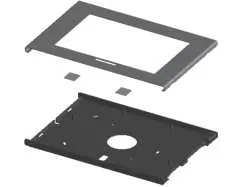
- Enclosure frame and backplate
- Mounting hardware (screws, spacers, and keys)
- Optional adhesive pads for specific tablet models (e.g., Galaxy Tab)
Installation and Mounting
- VESA Mounting: Attach the backplate to a VESA 100x100 compatible mount using appropriate screws (not included).
- Tablet Placement: Place the tablet into the backplate. If using a Galaxy Tab, apply the provided optional adhesive pads (H) as indicated in the diagram.
- Closing the Enclosure: Place the front frame over the backplate.
- Locking: Secure the enclosure using the provided keys to lock the mechanism.
Optional Security
The enclosure supports the use of a Kensington lock (not included) for additional physical security. Ensure the lock is properly engaged in the designated slot if required.
Practical help
Common problems
Ensure that the optional adhesive pads (H) are used if you are installing a Galaxy Tab model.
The enclosure requires a VESA 100x100 compatible mount. Ensure your mounting surface supports this standard.
Before use
- Verify all parts (A-H) are present according to the parts list.
- Ensure you have the correct screws for your specific VESA mount (not included).
- Check if your tablet model requires the optional adhesive pads (H).
- Have the provided keys ready for the locking mechanism.

Manual page author
Emily Carter
User documentation editor
Prepares concise manual descriptions and highlights the most useful setup, operation, and maintenance information for readers.