Vogel's PTS 12XX Secure Tablet Case Installation Guide
A quick installation guide for the Vogel's PTS 12XX secure tablet enclosure, covering component assembly, VESA mounting, and tablet securing procedures.
Table of contents
Quick guide from the manual
This document provides instructions for the assembly and mounting of the Vogel's PTS 12XX secure tablet enclosure. It covers the necessary hardware, VESA mounting, tablet placement, and locking mechanisms.
Components
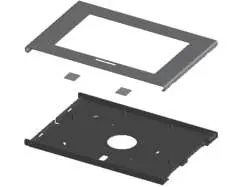
- A: Main enclosure base
- B: Front cover
- C: Spacers (4x)
- D: Screws (6x)
- E: Key (1x)
- F: Lock mechanism (1x)
- G: VESA mounting plate (4x)
- H: Adhesive pads (2x, for Galaxy Tab only)
Installation and Mounting
1. VESA Mounting: Attach the enclosure base (A) to a VESA 100x100 compatible mount using the provided hardware (G). Note that screws for attaching the mount to the wall or stand are not included.
2. Tablet Placement: Place the tablet into the base (A). If using a Galaxy Tab, apply the adhesive pads (H) as indicated in the diagram.
3. Securing the Enclosure: Place the front cover (B) over the base. Use the provided screws (D) to secure the cover to the base. Ensure the lock mechanism (F) is properly engaged using the key (E).
4. Optional Security: The enclosure supports the use of a Kensington lock (not included) for additional theft prevention.
Practical help
Common problems
Ensure that the adhesive pads (H) are used if installing a Galaxy Tab model.
The enclosure requires a VESA 100x100 mount. Ensure you have the appropriate screws for your specific wall or stand surface, as they are not included in the kit.
Before use
- Verify all components (A-H) are present according to the parts list.
- Ensure you have a VESA 100x100 compatible mount.
- Obtain appropriate screws for your mounting surface (not included).
- Keep the key (E) in a safe place for future access to the tablet.

Manual page author
Michael Turner
Technical manual editor
Reviews PDF manuals for structure, safety notes, and practical product details so readers can find the right information quickly.