General / Other Manuals
Redmi 15C Smartphone User Guide
Comprehensive guide for the Redmi 15C smartphone, covering technical specifications, safety, operation, maintenance, and troubleshooting.
Table of contents
Product Overview
The Redmi 15C is a high-performance smartphone designed for daily efficiency and multimedia consumption. It features a large 6.9-inch IPS LCD display with a 120Hz refresh rate, providing smooth visuals for gaming and video playback. The device is powered by the Mediatek Helio G81 Ultra chipset and runs on Android 15 with the HyperOS 2 interface, ensuring a modern and intuitive user experience.
Technical Specifications
The device is built with a durable glass front (Corning Gorilla Glass 3) and a robust frame. Key specifications include:
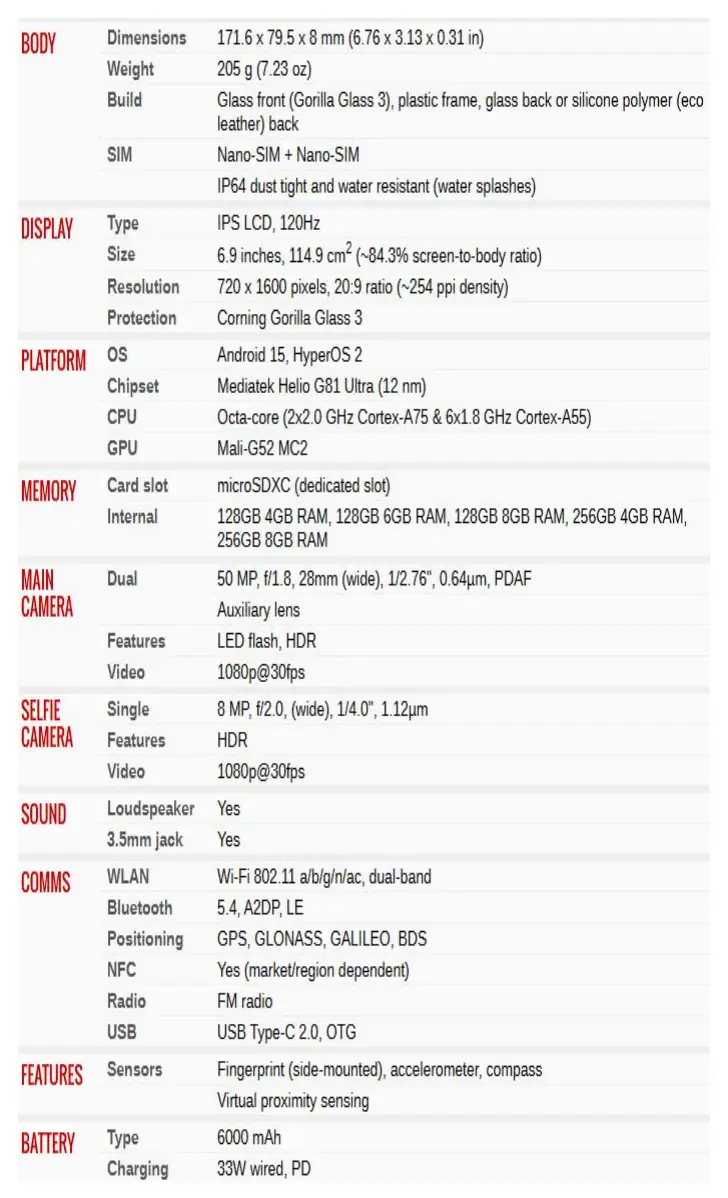
- Display: 6.9-inch IPS LCD, 720 x 1600 resolution.
- Processor: Octa-core Mediatek Helio G81 Ultra.
- Memory: Available in various configurations up to 256GB storage and 8GB RAM, with a dedicated microSDXC card slot.
- Camera: Dual 50MP main camera system and an 8MP selfie camera.
- Battery: 6000mAh capacity with 33W wired fast charging support.
- Connectivity: Wi-Fi 802.11 a/b/g/n/ac, Bluetooth 5.4, NFC, and USB Type-C 2.0.
Safety and Maintenance
To ensure the longevity and safety of your Redmi 15C, please adhere to the following guidelines:
- Water Resistance: The device is IP64 rated, meaning it is dust-tight and resistant to water splashes. Avoid submerging the device in water.
- Charging: Use only the provided 33W charger or compatible PD-certified chargers to prevent battery damage.
- Handling: While the device features Gorilla Glass 3, avoid dropping it on hard surfaces. Keep the device away from extreme temperatures.
- Cleaning: Use a soft, lint-free cloth to clean the screen. Avoid harsh chemicals or abrasive materials.
Operation and Troubleshooting
The Redmi 15C includes a side-mounted fingerprint sensor for secure unlocking. If you encounter performance issues, ensure your software is updated to the latest version of HyperOS. For connectivity problems, verify that your Wi-Fi and Bluetooth settings are correctly configured. If the device becomes unresponsive, a forced restart can often resolve minor software glitches. Always back up your data regularly to prevent loss during system updates or resets.
Disposal and Recycling
Please dispose of your device and its battery according to local environmental regulations. Do not discard the smartphone in household waste. Utilize authorized electronic waste collection points to ensure responsible recycling of components.
Related manuals
Related manuals from the same brand or category.