Rice Lake 160-10-7N Low-Profile Digital Athletic Scale
Professional-grade low-profile digital athletic scale with NTEP certification, featuring a versatile stand-alone indicator, BMI calculation, and USB/RS-232 connectivity.
Table of contents
Product Overview
The 160-10-7N is a high-accuracy, NTEP-certified low-profile digital athletic scale designed for reliable weight measurements. It features a versatile, stand-alone indicator that can be placed on a table, floor, or wall-mounted using the included bracket.
Safety Information
Warning: Failure to follow safety instructions may result in serious injury or death. Ensure all operators read the manual. Do not transport the scale while in use, do not use on slippery surfaces, and do not use if components are damaged. The scale must be placed on a flat, stable surface for accurate readings. Do not exceed the maximum capacity.
Setup and Assembly
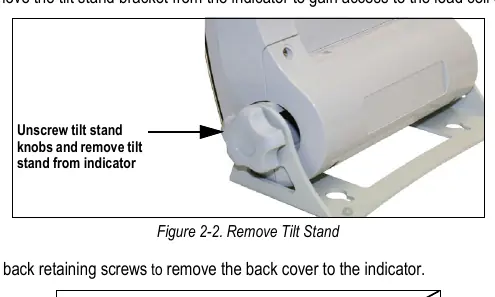
The scale includes a base, indicator, six AA batteries, an AC adapter, and communication cables. For optimal accuracy, place the scale on a hard, level surface. Use the integrated bubble level to ensure the base is perfectly horizontal. The indicator connects to the scale base via a load cell cable; ensure this is securely seated during setup.
Operation
The scale features an intuitive keypad for weighing, tare functions, and BMI calculations. Note: Some functions, such as BMI and Hold/Release, may be disabled when the unit is configured for NTEP-certified use. The scale supports both LB and KG modes, which can be toggled using the Print/LB/KG key.
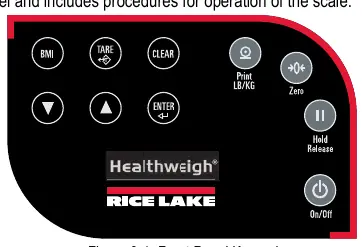
- Weighing: Simply step on the scale to obtain a reading. The lock annunciator indicates a stable weight.
- Tare: Use the Tare function to subtract the weight of additional items.
- BMI: The BMI function allows for quick body mass index calculation by entering patient height.
Communications
The unit includes RS-232 and USB ports for data transmission to a PC. Use a terminal emulation program to capture weight data. Note that Apple and Macintosh computers are not supported for direct data transfer; a Windows PC is required.
Maintenance and Troubleshooting
Regular maintenance involves checking for physical damage and inspecting the power adapter cord. Clean external surfaces with a damp cloth and mild soap. Do not immerse the scale in liquid or use isopropyl alcohol on the display. If the scale fails to turn on, check the batteries or power source. Error codes (e.g., E06, Err 1) are detailed in the troubleshooting section to assist in identifying issues like load cell connection errors or calibration needs.
Disposal
At the end of its life cycle, the product and its batteries must be disposed of at appropriate waste collection centers in accordance with local regulations to prevent environmental harm.

Manual page author
David Miller
Documentation analyst
Organizes user manual content into clear summaries, with attention to model details, product context, and everyday usability.