Installation Guide for Risco ProSYS B5 Plastic Accessory Box
Quick installation guide for the Risco ProSYS B5 plastic accessory box. Includes mounting hole maps for ProSYS and GT expansion modules, safety voltage limits, and technical specifications.
Table of contents
Manual images
Click an image to enlargeQuick guide from the manual
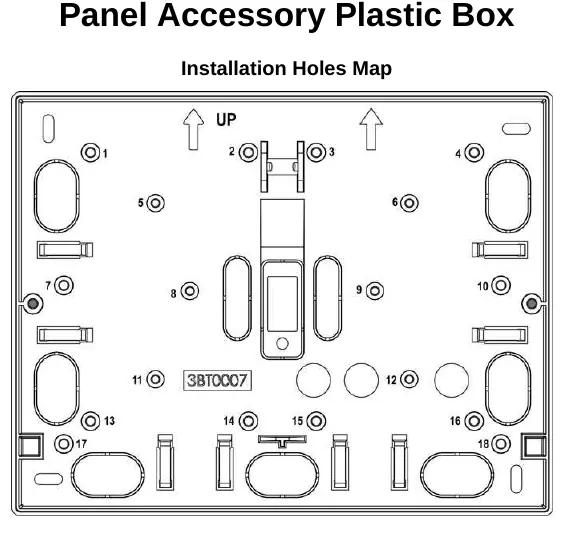
This installation guide provides instructions for mounting the Risco ProSYS B5 plastic accessory box. It includes specific hole maps for various expansion modules and technical specifications.
Important Safety Note: This box is only suitable for devices powered by voltages below 60VDC or 42.4VAC.
Installation of ProSYS Accessories
You can install a maximum of 2 of the following modules:
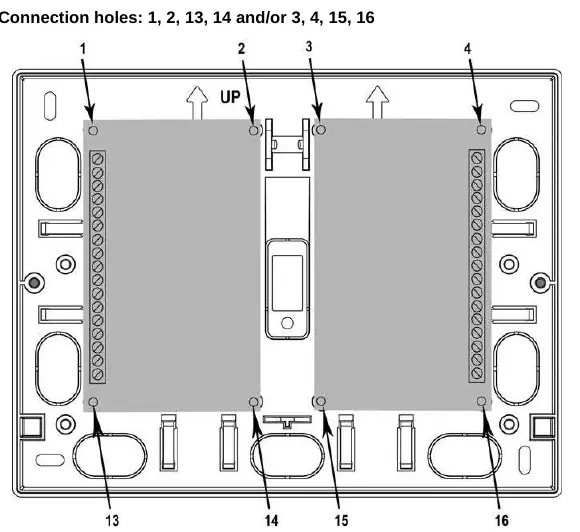
- ProSYS 8 Zone Expansion Module
- ProSYS 4 Relay Output Module
- ProSYS 8 O.C. Output Module
- ProSYS Event Log Expansion Module (512, 999)
- ProSYS X-10 Expansion Module
Connection holes: Use holes 1, 2, 13, 14 and/or 3, 4, 15, 16.
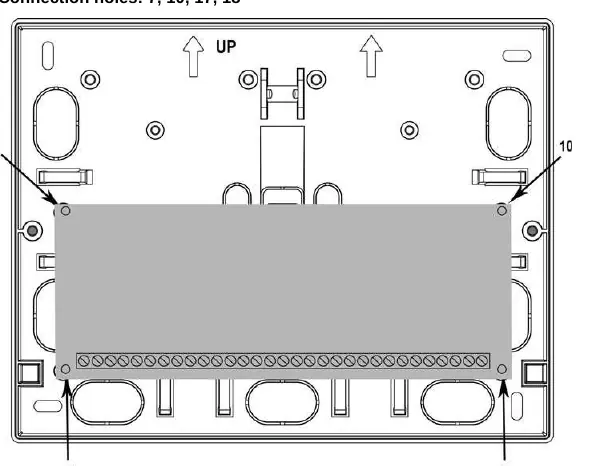
Installation of 16 Zone Expander
For a single 16 Zone Expander, use connection holes 7, 10, 17, 18.
Installation of GT Accessories
You can install a maximum of 2 of the following modules:
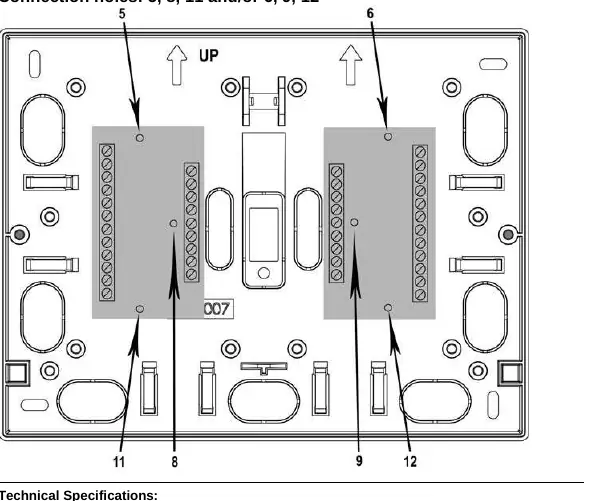
- Zone Expander (Code 02083)
- Relay Output Expander (Code 02085)
- ID Expander (Code 02087)
Connection holes: Use holes 5, 8, 11 and/or 6, 9, 12.
Technical Specifications
- Dimensions: 192 mm x 150 mm x 57 mm
- Certification: EN50131-3 Grade 3 Environmental class II
Practical help
Before use
- Verify the device voltage is below 60VDC or 42.4VAC.
- Identify the specific expansion module to be installed.
- Ensure the mounting surface is suitable for the box dimensions (192mm x 150mm x 57mm).
Specs in practice
- Certification
- EN50131-3 Grade 3 Environmental class II

Manual page author
David Miller
Documentation analyst
Organizes user manual content into clear summaries, with attention to model details, product context, and everyday usability.