Roku Streambar 14-Inch Soundbar with 4K / HDR Streaming User Guide
Comprehensive setup and usage guide for the Roku Streambar, covering installation, sound settings, voice control, and troubleshooting.
Table of contents
Product Overview
The Roku Streambar is a compact 14-inch soundbar that combines high-quality audio with 4K and HDR streaming capabilities. It is designed to enhance your TV audio while providing access to a wide range of streaming channels and content.
Getting Started
To begin, ensure you have all included components: the Roku Streambar, voice remote, power adapter, HDMI cable, and two AAA batteries. Follow these steps for installation:
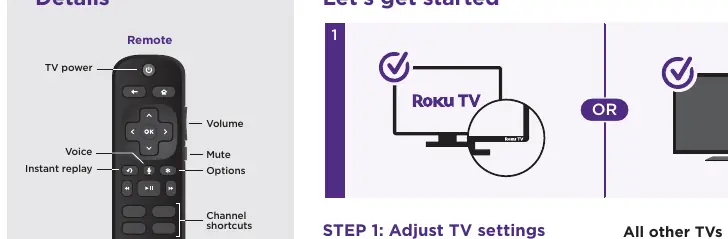
- Connect to Power: Use the provided power adapter to connect the device to a wall outlet.
- Connect to TV: Use the included HDMI cable to connect the Streambar to the HDMI port labeled ARC on your TV. If your TV lacks an HDMI-ARC port, use the included optical cable in addition to the HDMI cable.
- Select Input: Use your TV remote to select the HDMI input corresponding to the port used for the Streambar.
- Setup: Insert the batteries into the remote and follow the on-screen instructions to link your device to a Roku account.
Sound Settings and Features
You can customize your audio experience while streaming by accessing the Sound Settings menu. Available features include:
- Volume Leveling: Maintains consistent volume levels and reduces the loudness of commercials.
- Speech Clarity: Enhances voice frequencies to make dialogue easier to understand.
- Night Mode: Compresses dynamic range to lower loud sounds and boost quiet ones, preventing disturbances.
Voice Control and Connectivity
The included voice remote allows for hands-free control. Press and hold the voice button to issue commands such as launching channels, adjusting volume, or searching for content. You can also pair Bluetooth devices by navigating to Settings, selecting Remotes & devices, and choosing Pair Bluetooth device.
Common Questions and Troubleshooting
If you encounter issues, ensure that HDMI-CEC and ARC are enabled in your TV settings, as these are required for integrated control. A Roku account is necessary for streaming and managing subscriptions. Note that Roku does not charge for activation support; be wary of potential scams. For the best audio performance, place the Streambar at the front edge of your TV stand.