Home Appliances / Refrigerators
RS PRO RSİLDM-150H Laser Distance Meter
The RS PRO RSİLDM-150H is a compact, reliable laser distance meter designed for indoor applications. It features shortcut and soft-grip keys for addition, subtraction, area, and volume calculations, along with Bluetooth connectivity for...
Table of contents
Product Overview
The RS PRO RSİLDM-150H is a compact and handy laser distance meter specifically designed for indoor use. It features intuitive shortcut and soft-grip keys, making distance, area, and volume calculations fast and reliable.
Safety Instructions
This device is a Class 2 laser product. Do not stare into the laser beam or direct it towards other people. Eye protection is typically provided by natural aversion responses, such as the blink reflex. Avoid using the device near unprotected machinery, on unstable surfaces like ladders or scaffolding, or aiming it directly at the sun.
Start-Up and Operation
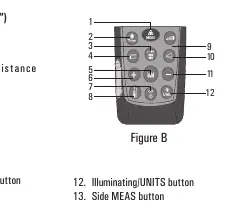
To begin, insert two AA alkaline batteries, ensuring correct polarity. The device features a multi-functional end piece for measurements from edges or corners. Use the reference button to toggle between measuring from the front, rear, or tripod mount. The device automatically switches off after three minutes of inactivity to conserve battery life.
Measurement Functions
- Single Distance Measurement: Activate the laser and trigger the measurement with the MEAS button.
- Continuous Measurement (Tracking): Ideal for transferring measurements from construction plans; displays min/max values dynamically.
- Area and Volume: Dedicated modes for calculating space dimensions.
- Indirect Measurement: Uses Pythagorean theorem or tilt sensor to determine distances when direct access is obstructed.
- Stake Out Function: Allows users to enter two specific distances to mark off defined lengths.
- Tilt Measurement: Uses an integrated inclination sensor to measure angles up to ±90°.
Bluetooth Connectivity
The device supports Bluetooth 4.0 for sending measurements to a smartphone or PC. Use the Meterbox app to connect. If prompted for a PIN during the first connection, enter 0000.
Maintenance and Troubleshooting
Keep the device clean by wiping it with a damp, soft cloth. Do not immerse in water or use aggressive cleaning agents. If an error code appears (e.g., 204, 208, 255), follow the corrective measures listed in the manual, such as using a target plate for weak signals or restarting the device for hardware errors.
Related manuals
Related manuals from the same brand or category.