Quick Start Guide for Ruko Carle Robot 1088-BLUE
A quick start guide for the Ruko Carle robot. Includes instructions for charging, battery installation, app setup, Bluetooth pairing, and basic operation.
Quick Start Guide
Follow these steps to set up and begin using your Ruko Carle robot:
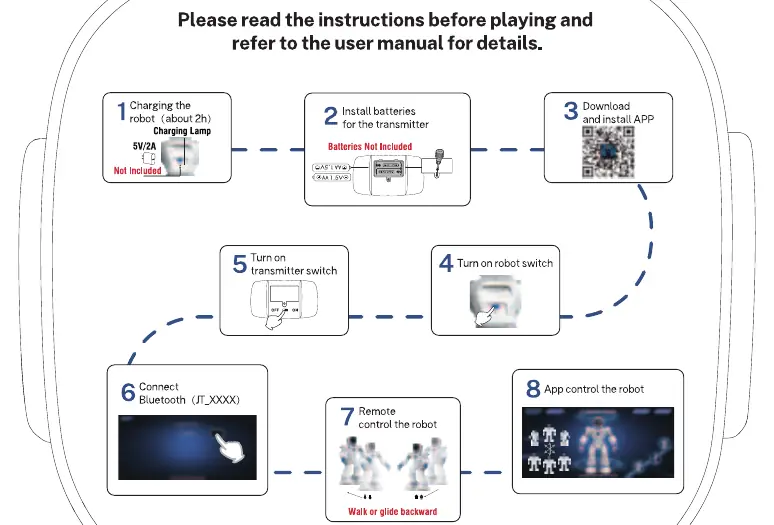
- Charging: Charge the robot for approximately 2 hours. Note that a 5V/2A charger is required but not included.
- Transmitter Setup: Install AA 1.5V batteries (not included) into the transmitter.
- App Installation: Download and install the companion app on your mobile device.
- Power On: Turn on the power switch located on the robot.
- Transmitter Power: Turn on the power switch on the transmitter.
- Bluetooth Connection: Connect your device to the robot via Bluetooth. Look for the device name starting with JT_XXXX.
- Remote Control: Use the transmitter to control the robot, such as walking or gliding backward.
- App Control: Use the installed app to access advanced control features for the robot.
Support and Contact
If you have any questions about this product, please contact Ruko support by sending an email to [email protected] or visit their website at www.rukotoy.com.
Official resources from the manual
Manufacturer information
Ruko
Practical help
Common problems
Ensure the robot is turned on and check your device's Bluetooth settings for a connection named JT_XXXX.
Verify that both the robot and the transmitter are switched on and that the transmitter has fresh AA batteries installed.
Before use
- Charge the robot for approximately 2 hours.
- Ensure you have a 5V/2A charger (not included).
- Install AA 1.5V batteries in the transmitter (not included).
- Download and install the Ruko app.
- Turn on the robot switch.
- Turn on the transmitter switch.

Manual page author
Michael Turner
Technical manual editor
Reviews PDF manuals for structure, safety notes, and practical product details so readers can find the right information quickly.