Sabrent EC-OCUB 2.5-Inch SATA to USB 3.0 Enclosure User Manual
Quick guide for the Sabrent EC-OCUB 2.5-inch SATA to USB 3.0 enclosure. Learn how to install your hard drive and connect the device with this easy-to-follow manual.
Quick answers from the manual
Quick answer
- The Sabrent EC-OCUB is a tool-free 2.5-inch SATA to USB 3.0 enclosure. To use it, slide off the lid, insert your SATA drive, snap the lid back on, and connect it to your computer via USB. p. 1, 2, 3, 4
Key actions
- Install the hard drive p. 2, 3
- Connect to PC p. 4
First start
- Connect the device p. 4
Problems and fixes
Check cable connections and ensure the drive is seated correctly.
p. 4Where to find it in the PDF
- Title Page p. 1
- Installation Steps p. 2, 3, 4
Table of contents
Manual images
Click an image to enlargeQuick guide from the manual
The Sabrent EC-OCUB is a 2.5-inch SATA to USB 3.0 enclosure designed for easy, tool-free hard drive installation. This device allows you to convert an internal 2.5-inch SATA drive into an external USB drive.
Installation
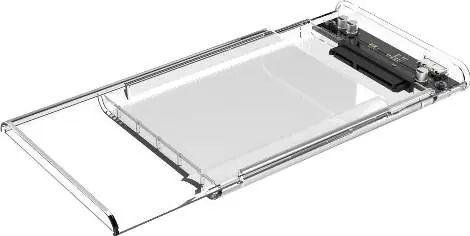
Step 1: Open the enclosure
Remove the lid by carefully sliding it out. The enclosure is designed for tool-free operation and does not require any screws to be securely attached.
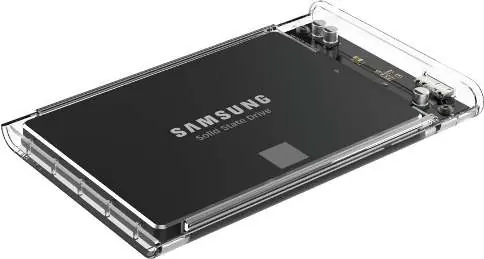
Step 2: Install the disk
Insert your 2.5-inch SATA disk into the enclosure, ensuring it is properly aligned and seated in the internal SATA connector.
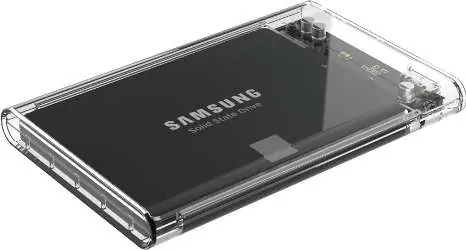
Step 3: Close and connect
Slide the lid back into place until it snaps shut. Connect the provided USB cable to both the enclosure and your computer.
Usage notes
This product is Plug & Play and does not require any additional drivers to function. If the drive is not recognized, ensure the cable is securely connected to both the enclosure and the computer.
Manufacturer information
Sabrent
Practical help
Common problems
Ensure the USB cable is securely connected to both the enclosure and the PC. Verify the drive is properly seated in the internal SATA connector.
Before use
- Ensure you have a compatible 2.5-inch SATA drive
- Slide the lid off carefully to open the enclosure
- Align the drive with the internal connector
- Ensure the lid snaps shut after installation

Manual page author
Emily Carter
User documentation editor
Prepares concise manual descriptions and highlights the most useful setup, operation, and maintenance information for readers.