User Manual for Sabrent MS-WSML Wireless Mouse
Quick guide for the Sabrent MS-WSML wireless mouse. Learn how to install the AA battery, connect the USB nano receiver, and understand key technical specifications.
Quick answers from the manual
Quick answer
- The Sabrent MS-WSML is a wireless mouse that uses one AA alkaline battery and a USB nano receiver. To set it up, insert the battery, turn on the power switch, and plug the receiver into your computer. p. 2, 3
Key actions
- Insert AA battery p. 2
- Connect USB receiver p. 3
First start
- Insert battery, turn on power, connect USB receiver. p. 2, 3
Technical specifications
| Parameter | Value | Meaning | Pages |
|---|---|---|---|
| Resolution | 1200 DPI | Sensor precision | p. 2 |
| Frequency | 2405MHz - 2476MHz | Wireless operating frequency | p. 2 |
Where to find it in the PDF
- Features and Battery Installation p. 2
- Connecting the Receiver p. 3
Table of contents
Manual images
Click an image to enlargeQuick guide from the manual
The Sabrent MS-WSML is a wireless mouse designed for precise tracking. This guide covers the essential steps to get your device running, including battery installation and connecting the USB receiver.
Features
- Advanced high precision optical sensor
- Ergonomic design for comfort
- Multifunction wheel for scroll and zoom
- Self-storing nano receiver
- Resolution: 1200 DPI
Installing batteries
The mouse requires one AA alkaline battery to operate.
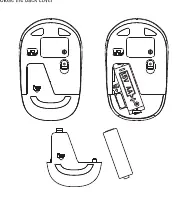
- Open the back cover of the mouse.
- Insert the AA battery into the compartment, ensuring the polarity matches the markings inside.
- Close the back cover.
Connecting the receiver
The mouse uses a plug-and-play USB nano receiver.
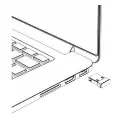
- Locate an available USB port on your computer.
- Insert the nano receiver into the USB port.
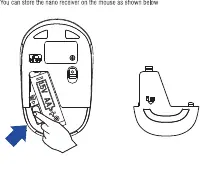
Self-storing nano receiver
For travel convenience, the nano receiver can be stored inside the battery compartment of the mouse when not in use.
Technical specifications
- Resolution: 1200 DPI
- Frequency: 2405MHz - 2476MHz
- Rating: 1.5V - 20mA
Manufacturer information
Sabrent
Practical help
Common problems
Ensure the AA battery is installed correctly and the power switch on the bottom of the mouse is set to ON.
Check the battery compartment; the nano receiver is designed to be stored inside the mouse.
Before use
- Ensure you have one AA alkaline battery.
- Locate an available USB port on your computer.
- Check the power switch on the bottom of the mouse.

Manual page author
David Miller
Documentation analyst
Organizes user manual content into clear summaries, with attention to model details, product context, and everyday usability.