Samsung 00017B Replacement Remote Control Button Mapping
Quick reference guide for the Samsung 00017B replacement remote control. View the complete button mapping table to understand how original remote functions correspond to the replacement unit.
Table of contents
Manual images
Click an image to enlargeQuick guide from the manual
This document serves as a button mapping reference for the Samsung 00017B replacement remote control. It helps users identify which button on the replacement remote corresponds to the original functions found on the factory-supplied unit.
Button Mapping Overview
The replacement remote control is designed to replicate the functionality of the original Samsung 00017B. Because the physical layout and labeling may differ, use the following mapping to locate specific commands.
Function Reference
Below are the key function mappings from the original remote to the replacement unit:
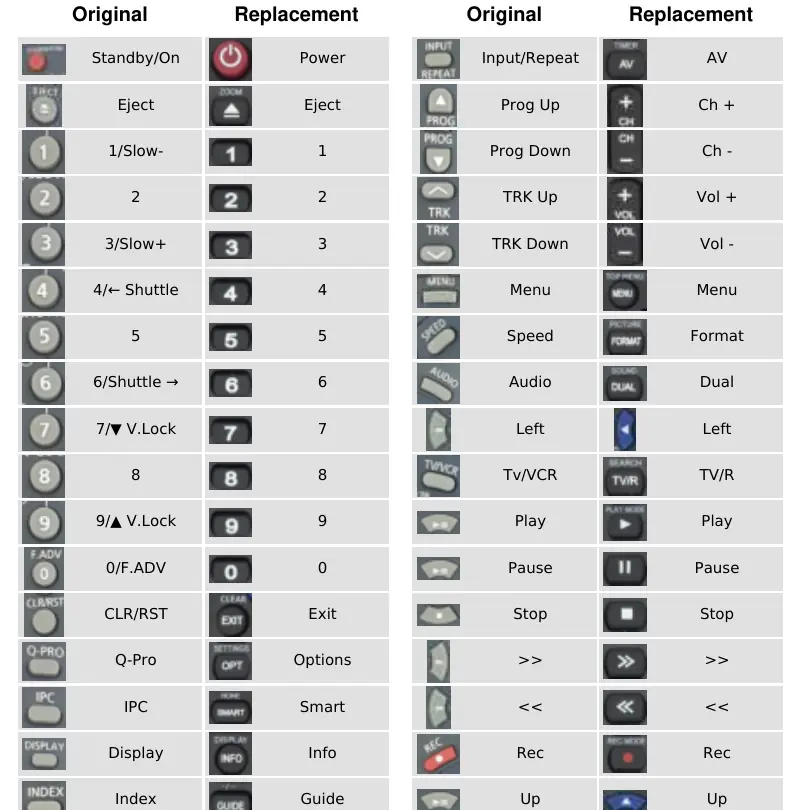
- Power: Standby/On
- Eject: Eject
- 1-9: 1-9
- 0: 0/F.ADV
- Exit: CLR/RST
- Options: Q-Pro
- Smart: IPC
- Info: Display
- Guide: Index
- AV: Input/Repeat
- Ch +/-: Prog Up/Down
- Vol +/-: TRK Up/Down
- Menu: Menu
- Format: Speed
- Dual: Audio
- TV/R: Tv/VCR
- Play/Pause/Stop: Play/Pause/Stop
- Rec: Rec
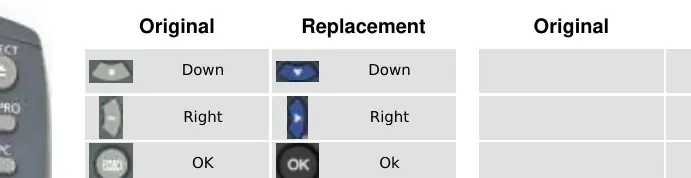
- Up/Down/Right/OK: Up/Down/Right/OK
Official resources from the manual
Manufacturer information
Samsung Electronics
Practical help
Common problems
Refer to the mapping table to find the correct replacement button for the desired function.
Check if the function is mapped to a different button name on the replacement remote, such as 'AV' for 'Input/Repeat'.
Before use
- Verify the remote model is 00017B
- Ensure batteries are installed correctly
- Compare the original remote layout with the provided mapping table

Manual page author
Emily Carter
User documentation editor
Prepares concise manual descriptions and highlights the most useful setup, operation, and maintenance information for readers.